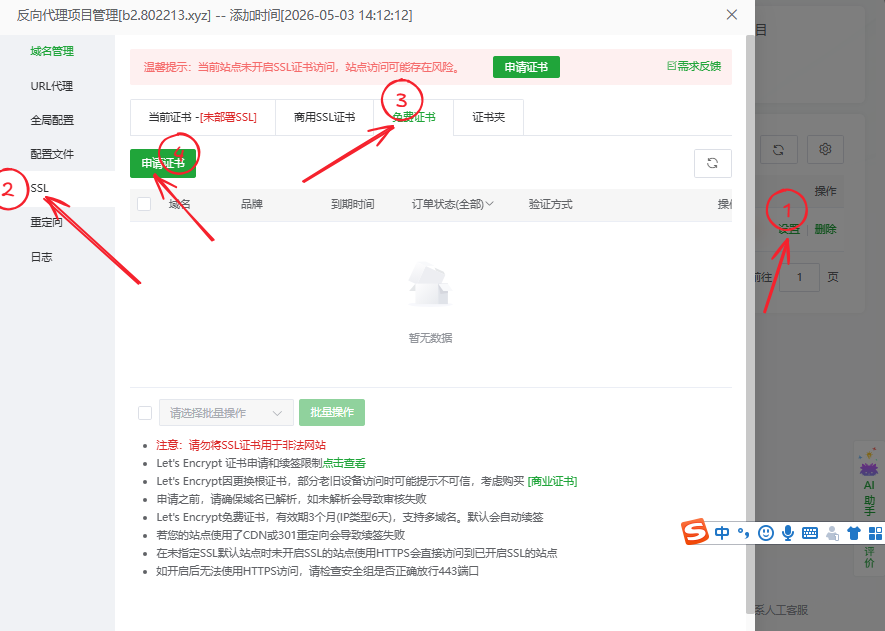
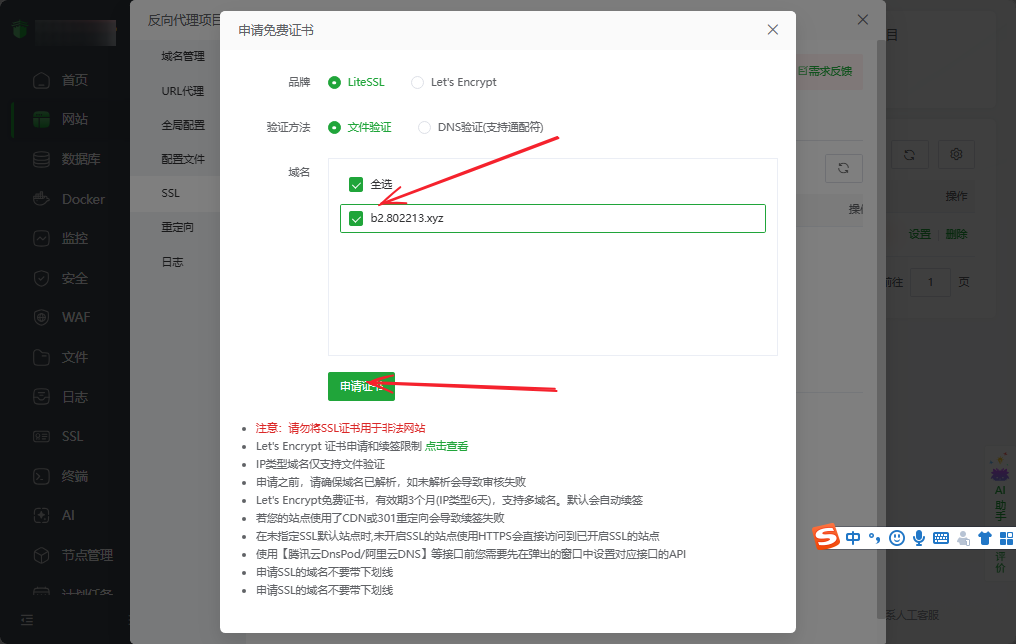
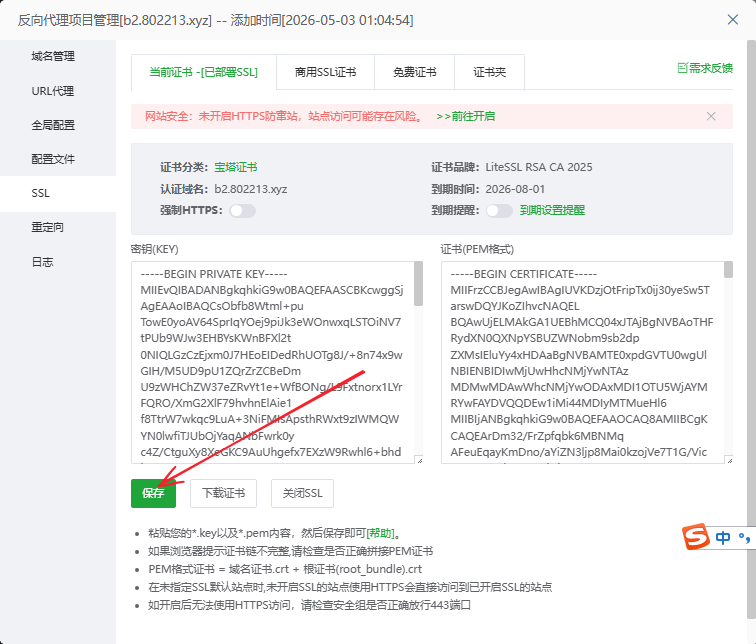
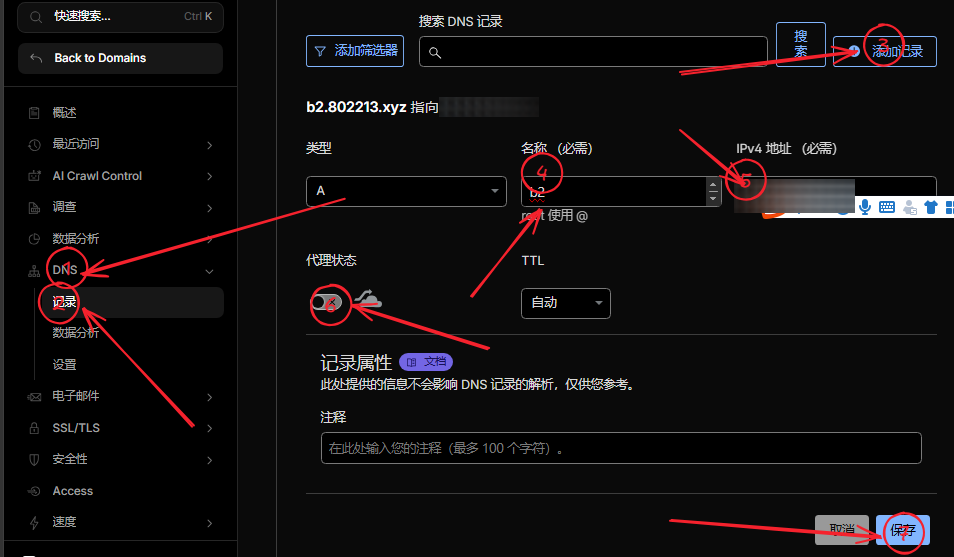
<?xml version="1.0" encoding="utf-8"?>
<feed xmlns="http://www.w3.org/2005/Atom">
  <author>
    <name>Fanchuanhaha</name>
  </author>
  <generator uri="https://hexo.io/">Hexo</generator>
  <id>https://lobev66.github.io/kf1145fan.github.io/</id>
  <link href="https://lobev66.github.io/kf1145fan.github.io/" rel="alternate"/>
  <link href="https://lobev66.github.io/kf1145fan.github.io/atom.xml" rel="self"/>
  <rights>All rights reserved 2026, Fanchuanhaha</rights>
  <subtitle>welcome to my blog</subtitle>
  <title>Fanchuanhaha's Blog</title>
  <updated>2026-10-03T13:01:04.404Z</updated>
  <entry>
    <author>
      <name>Fanchuanhaha</name>
    </author>
    <content>
      <![CDATA[<p>aaa</p>]]>
    </content>
    <id>https://lobev66.github.io/kf1145fan.github.io/2026/10/03/2026-10-03-aaa/</id>
    <link href="https://lobev66.github.io/kf1145fan.github.io/2026/10/03/2026-10-03-aaa/"/>
    <published>2026-10-03T00:00:00.000Z</published>
    <summary>
      <![CDATA[<p>aaa</p>]]>
    </summary>
    <title>aaa</title>
    <updated>2026-10-03T13:01:04.404Z</updated>
  </entry>
  <entry>
    <author>
      <name>Fanchuanhaha</name>
    </author>
    <category term="测试" scheme="https://lobev66.github.io/kf1145fan.github.io/categories/%E6%B5%8B%E8%AF%95/"/>
    <category term="项目" scheme="https://lobev66.github.io/kf1145fan.github.io/tags/%E9%A1%B9%E7%9B%AE/"/>
    <content>
      <![CDATA[<p>123</p>]]>
    </content>
    <id>https://lobev66.github.io/kf1145fan.github.io/2026/09/25/2026-09-25-123/</id>
    <link href="https://lobev66.github.io/kf1145fan.github.io/2026/09/25/2026-09-25-123/"/>
    <published>2026-09-25T00:00:00.000Z</published>
    <summary>
      <![CDATA[<p>123</p>]]>
    </summary>
    <title>123</title>
    <updated>2026-10-03T13:01:04.404Z</updated>
  </entry>
  <entry>
    <author>
      <name>Fanchuanhaha</name>
    </author>
    <content>
      <![CDATA[<h1 id="端到端验证评论与工作流-0920"><a href="#端到端验证评论与工作流-0920" class="headerlink" title="端到端验证评论与工作流-0920"></a>端到端验证评论与工作流-0920</h1><p>这是通过浏览器端到端测试发布的一篇文章。</p><p>测试正文段落一：验证 Cloudflare Worker 博客后台的发布流程是否正常工作。</p><p>测试正文段落二：检查文章能否成功提交并自动 commit 到 GitHub 仓库。</p><p>测试正文段落三：如果看到这篇文章，说明整个工作流（编辑→发布→GitHub commit）全部正常。</p>]]>
    </content>
    <id>https://lobev66.github.io/kf1145fan.github.io/2026/09/20/2026-09-20-%E7%AB%AF%E5%88%B0%E7%AB%AF%E9%AA%8C%E8%AF%81%E8%AF%84%E8%AE%BA%E4%B8%8E%E5%B7%A5%E4%BD%9C%E6%B5%81-0920/</id>
    <link href="https://lobev66.github.io/kf1145fan.github.io/2026/09/20/2026-09-20-%E7%AB%AF%E5%88%B0%E7%AB%AF%E9%AA%8C%E8%AF%81%E8%AF%84%E8%AE%BA%E4%B8%8E%E5%B7%A5%E4%BD%9C%E6%B5%81-0920/"/>
    <published>2026-09-20T00:00:00.000Z</published>
    <summary>
      <![CDATA[<h1 id="端到端验证评论与工作流-0920"><a href="#端到端验证评论与工作流-0920" class="headerlink" title="端到端验证评论与工作流-0920"></a>端到端验证评论与工作流-0920</h1><p>这是通过浏览器端到端测试发布]]>
    </summary>
    <title>端到端验证评论与工作流-0920</title>
    <updated>2026-10-03T13:01:04.404Z</updated>
  </entry>
  <entry>
    <author>
      <name>Fanchuanhaha</name>
    </author>
    <category term="测试" scheme="https://lobev66.github.io/kf1145fan.github.io/categories/%E6%B5%8B%E8%AF%95/"/>
    <category term="测试" scheme="https://lobev66.github.io/kf1145fan.github.io/tags/%E6%B5%8B%E8%AF%95/"/>
    <category term="自动化# 自动化发布测试  这是通过管理后台自动发布的一篇测试文章" scheme="https://lobev66.github.io/kf1145fan.github.io/tags/%E8%87%AA%E5%8A%A8%E5%8C%96-%E8%87%AA%E5%8A%A8%E5%8C%96%E5%8F%91%E5%B8%83%E6%B5%8B%E8%AF%95-%E8%BF%99%E6%98%AF%E9%80%9A%E8%BF%87%E7%AE%A1%E7%90%86%E5%90%8E%E5%8F%B0%E8%87%AA%E5%8A%A8%E5%8F%91%E5%B8%83%E7%9A%84%E4%B8%80%E7%AF%87%E6%B5%8B%E8%AF%95%E6%96%87%E7%AB%A0/"/>
    <category term="用于验证：  1. 后台发布是否自动触发 GitHub 工作流 2. 博客是否自动更新 3. 评论窗口是否只在文章详情页显示" scheme="https://lobev66.github.io/kf1145fan.github.io/tags/%E7%94%A8%E4%BA%8E%E9%AA%8C%E8%AF%81%EF%BC%9A-1-%E5%90%8E%E5%8F%B0%E5%8F%91%E5%B8%83%E6%98%AF%E5%90%A6%E8%87%AA%E5%8A%A8%E8%A7%A6%E5%8F%91-GitHub-%E5%B7%A5%E4%BD%9C%E6%B5%81-2-%E5%8D%9A%E5%AE%A2%E6%98%AF%E5%90%A6%E8%87%AA%E5%8A%A8%E6%9B%B4%E6%96%B0-3-%E8%AF%84%E8%AE%BA%E7%AA%97%E5%8F%A3%E6%98%AF%E5%90%A6%E5%8F%AA%E5%9C%A8%E6%96%87%E7%AB%A0%E8%AF%A6%E6%83%85%E9%A1%B5%E6%98%BE%E7%A4%BA/"/>
    <content>
      <![CDATA[<h1 id="eªa¨aOEaa¸aeµe¯"><a href="#eªa¨aOEaa¸aeµe¯" class="headerlink" title="èªå¨ååå¸æµè¯"></a>èªå¨ååå¸æµè¯</h1><p>è¿æ¯éè¿ç®¡çåå°èªå¨åå¸çä¸ç¯æµè¯æç« ï¼ç¨äºéªè¯ï¼</p><ol><li>åå°åå¸æ¯å¦èªå¨è§¦å GitHub å·¥ä½æµ</li><li>åå®¢æ¯å¦èªå¨æ´æ°</li><li>è¯è®ºçªå£æ¯å¦åªå¨æç« è¯¦æé¡µæ¾ç¤º</li></ol>]]>
    </content>
    <id>https://lobev66.github.io/kf1145fan.github.io/2026/09/20/2026-09-20-%E8%87%AA%E5%8A%A8%E5%8C%96%E5%8F%91%E5%B8%83%E6%B5%8B%E8%AF%95%E6%96%87%E7%AB%A0/</id>
    <link href="https://lobev66.github.io/kf1145fan.github.io/2026/09/20/2026-09-20-%E8%87%AA%E5%8A%A8%E5%8C%96%E5%8F%91%E5%B8%83%E6%B5%8B%E8%AF%95%E6%96%87%E7%AB%A0/"/>
    <published>2026-09-20T00:00:00.000Z</published>
    <summary>
      <![CDATA[<h1 id="eªa¨aOEaa¸aeµe¯"><a href="#eªa¨aOEaa¸aeµe¯" class="headerlink" title="èªå¨ååå¸æµè¯"></a>èªå¨ååå¸æµè]]>
    </summary>
    <title>自动化发布测试文章</title>
    <updated>2026-10-03T13:01:04.404Z</updated>
  </entry>
  <entry>
    <author>
      <name>Fanchuanhaha</name>
    </author>
    <category term="日常" scheme="https://lobev66.github.io/kf1145fan.github.io/categories/%E6%97%A5%E5%B8%B8/"/>
    <category term="日常" scheme="https://lobev66.github.io/kf1145fan.github.io/tags/%E6%97%A5%E5%B8%B8/"/>
    <content>
      <![CDATA[<h1 id="新の学校-旧の朋友"><a href="#新の学校-旧の朋友" class="headerlink" title="新の学校&amp;旧の朋友"></a>新の学校&amp;旧の朋友</h1><p>上上上周军的训，上上周开学上的课，往日初三的光景已不复存在，我已经成为一名高宗牲了(， 这几周除了开学还发生了些事情，和我朋友的</p><h1 id="学校"><a href="#学校" class="headerlink" title="学校"></a>学校</h1><h2 id="简介"><a href="#简介" class="headerlink" title="简介"></a>简介</h2><p>先来说说学校，我考上的是广州市第九十七中学江南新苑校区<br>之前我是怎么也没想到我中考能多蹦出来40分上到这个公办的高中的<br>虽然说只是一所普通的高中，广州市里来看算是中规中矩的了，但是我能上到已经是很好的了<br>然后我也不知道怎么的又被分到次重点班去了（）<br>只是这个学校之前是初中来的，去年才开始招生，所以说我们高中应该是“寄生”在初中里的，而我的初中也是“寄生”寄生在高中里面的，可以当寄生虫了<br>我家距离学校7公里，每天上下学都得加起来有一个多小时（悲 不过有手机看</p><h2 id="环境"><a href="#环境" class="headerlink" title="环境"></a>环境</h2><p>环境嘛，由于是新一点的校区，我感觉是环境不错的，教室很好，但是学校是挺小的，就比我初中那个学校大一点<br>厕所，一般般，比本部的好，至少没有臭味，但和我初中的比就是小巫见大巫了，厕所隔间是有门的虽然好多锁不上):</p><h2 id="食堂"><a href="#食堂" class="headerlink" title="食堂"></a>食堂</h2><p>明以食为天所以食堂还是非常重要的<br>我们这的食堂怎么说呢，你说他好吧比不上很多学校，不如本部好，你说他不好又比我初中好，反正就是还可以不算是难以下咽，是每天饭箱给我们送上来的</p><h2 id="氛围"><a href="#氛围" class="headerlink" title="氛围"></a>氛围</h2><p>这是个很模糊的概念我这抠脚语文可能表达不清楚<br>首先是班级的氛围怎么说呢 I found most of my classmates and teachers friendly and helpful<br>反正这两周给我的感觉是这样，以后我就不知道了，“暴露本性”也说不准<br>然后就是学校的氛围，反正我感觉挺好的，没有那种压抑，怎么说呢，反正还可以，或许是和初中挤得太近了，他们太有活力了也说不定<br>同样是反正这两周给我的感觉是这样，以后我就不知道了<br><strong>上面的都是我个人观点</strong></p><h2 id="学习"><a href="#学习" class="headerlink" title="学习"></a>学习</h2><p>去学校最主要的肯定还是要学习的嘛<br>这两周感觉还好，后面应该会不好<br>语文不会写英语啥都听不懂（就我这抠脚大英语貌似是要有点完蛋），数理化倒是还好，理科战胜自带保底机制的，再差也差不到哪去，政治历史这个我不知道，反正只要合格考就行，我肯定是不会选这个的，but初中的的地理历史强势回归了cao，初中这两科基本没学，就是最后几节课老师发的必背卷看了几眼然后考出了个B，可谓是一点基础没有，没事大家都差不多<br>我是文科真得跟上去了，不努努力给中考多出来的40分补上去我就得吊车尾了</p><h2 id="总结"><a href="#总结" class="headerlink" title="总结"></a>总结</h2><p>也没什么好总结的，就是过得还可以现在，感觉还好</p><h1 id="朋友"><a href="#朋友" class="headerlink" title="朋友"></a>朋友</h1><p>（他已经允许我吧这件事说出来了）<br><strong>以下内容仅为我个人观点内容可能引人不适，内容由AI生成，纯属虚构请勿当真，可能无法理解，应为可能我是乱写的，我无法保证内容真实性,任何后果本人均不负责，不同意清退出此文章</strong><br>这人你可能没听过，但是如果折腾小米2s，现在还在关注消息的话，那你应该知道最近一个miui10安卓6的包，他对这个包贡献不小，叫kf1145fan</p><p>为什么说是旧の朋友呢<br>因为我说的是我的朋友，也是他的朋友<br>我和他幼儿园前一直认识到现在的了<br>就开学过后，应该就是开始军训时候吧，两人能见面多的了，暑假也几乎每天能见到面但是没有那么频繁<br>然后我就发现他不对劲了，不知道怎么样的，一直都粘着我，生怕从我身上掉下来一样（我能确定他性取向是双性恋）<br>以前虽然说也和我比较亲密，完全变了个人一样，玛雅给我担心坏了（<br>然后一就问他怎么了，我以前问他这样类似的问题他都不愿意说的（初三时候他想自杀就是我问了好久他才说的），而这次他直接就说了<br>我没法用文字表达出我想说的下面的东西，他说的已经够模糊了又是半个月前的是我表达能力也不行<br>大概就是这样的：<br>他有个初二通过游戏群里的刷机资源认识上的，现在已经快两年了，就在初三开学时候他不知道怎么了怕自己废了就开始努力学习了，然后他也不知道怎么了，前一个月还好，后面不知道怎么了看他情绪越来越低落，然后也不找我，后来知道其实是去找他那个朋友了，后面这半年来也是对他那个朋友很依恋，粘上可以这么说，但是呢，貌似是他那个朋友不怎么在意他，他那个心里我看着是好了，真的，你白天看完全没有问题，晚上回家路上几乎也没啥问题<br>最近开学后他那位朋友貌似是他说完全不理他了，消息不回说懒得回，好了，这回出问题了，他应该是生怕再丢到我（<br>我也不知道怎么办了。。。<br>我也不能让他整天这样，他不好我也难受<br>他之前买了亿堆心理学的书，初中时候就在有空时候就看，基本是看完了<br>我去他家找到本亲密关系看了一下<br>“要与他人建立亲密关系的普通而又强烈的内驱力”问ai说着正式归属需要未被满足时的正常反应，饿，这个应该不太可能还有我在呢，而且它的原生家庭也挺好的<br>他算是低自尊高神经质恐惧又痴迷型的应该<br>我从理性的角度分析，额算了我不会分析这文章就这样烂尾吧<br>我猜应该是这样：他一直很在意这段关系 &gt; 然后他朋友又不明不白的不理他了 &gt; 然后给旧伤翻出来了<br>我是真的希望他能好起来。。。他对我来说真的很重要<br>我也是迷迷糊糊的写完这些发的，不对的地方还请嘴下留情</p><p>好了今天是9&#x2F;19<br>上学没时间写只有周末有空<br>额，我寻思我记得在书上看到过说什么就是说朋友不明不白的就不理了就会有什么什么的，那聪慧的我就想着直接让他去问一下他 为什么不理他了，是在上周末的凌晨他是这样和我说的<br>然后第二天呢我看他也是好一点了，太好了（鬼知道他为什么还是粘着我）<br>内容由AI生成，请注意辨别。</p>]]>
    </content>
    <id>https://lobev66.github.io/kf1145fan.github.io/2026/09/13/%E6%96%B0%E3%81%AE%E5%AD%A6%E6%A0%A1-%E6%97%A7%E3%81%AE%E6%9C%8B%E5%8F%8B/</id>
    <link href="https://lobev66.github.io/kf1145fan.github.io/2026/09/13/%E6%96%B0%E3%81%AE%E5%AD%A6%E6%A0%A1-%E6%97%A7%E3%81%AE%E6%9C%8B%E5%8F%8B/"/>
    <published>2026-09-13T17:06:07.000Z</published>
    <summary>
      <![CDATA[<h1 id="新の学校-旧の朋友"><a href="#新の学校-旧の朋友" class="headerlink" title="新の学校&amp;旧の朋友"></a>新の学校&amp;旧の朋友</h1><p>上上上周军的训，上上周开学上的课，往日初三的光景已不复存在，我已经成]]>
    </summary>
    <title>
      <![CDATA[新の学校&旧の朋友]]>
    </title>
    <updated>2026-10-03T13:01:04.404Z</updated>
  </entry>
  <entry>
    <author>
      <name>Fanchuanhaha</name>
    </author>
    <category term="Cloudflare" scheme="https://lobev66.github.io/kf1145fan.github.io/categories/Cloudflare/"/>
    <category term="项目" scheme="https://lobev66.github.io/kf1145fan.github.io/tags/%E9%A1%B9%E7%9B%AE/"/>
    <category term="cloudflare" scheme="https://lobev66.github.io/kf1145fan.github.io/tags/cloudflare/"/>
    <content>
      <![CDATA[<h1 id="使用cloudflare-github搭建免费床图"><a href="#使用cloudflare-github搭建免费床图" class="headerlink" title="使用cloudflare+github搭建免费床图"></a>使用cloudflare+github搭建免费床图</h1><blockquote><p>虽然说市面上已经有非常非常多的这样的床图项目了，但是我习惯了彩虹云外链网盘的那样的界面，于是我就用ai吧这个项目移植到了cloudflareworker上面</p></blockquote><h2 id="准备工作"><a href="#准备工作" class="headerlink" title="准备工作"></a>准备工作</h2><p>一个cloudflare账号<br>一个GitHub账号<br>一个脑子（最重要的）</p><h2 id="fork项目"><a href="#fork项目" class="headerlink" title="fork项目"></a>fork项目</h2><p>打开<a href="https://github.com/fanchuanhaha/cf-pan/">https://github.com/fanchuanhaha/cf-pan/</a></p><p>点击右上方fork按钮 fork到你自己那里</p><h2 id="配置信息"><a href="#配置信息" class="headerlink" title="配置信息"></a>配置信息</h2><p>然后来到cloudflare主页 复制上方地址内你的账户ID<br>例如<br><a href="https://dash.cloudflare.com/6fd11v1vh19b82ef98gkgk2gd7cca5c2b/home">https://dash.cloudflare.com/6fd11v1vh19b82ef98gkgk2gd7cca5c2b/home</a></p><p>就复制6fd11v1vh19b82ef98gkgk2gd7cca5c2b</p><p>然后返回GitHub，点击刚刚fork了的项目的上面的settings左边找到secrets and variables 点击actions，点击New repository secret<br>Name那里输入<code>CLOUDFLARE_ACCOUNT_ID</code> 下面粘贴你刚刚复制的cf的id 返回cf，点击右上角头像，点击配置文件，点击左侧API令牌，点击创建令牌，点击编辑 Cloudflare Workers旁边的使用模板，权限那里添加更多，选择D1 权限改成编辑，下方两个都改成全部账户全部区域，点击下方创建令牌，复制你的令牌，来到GitHub，再点击New repository secret，name输入<code>CLOUDFLARE_API_TOKEN</code> 下方粘贴你刚刚复制的，点击上方action，点击我同意，点击左侧部署到cloudflareworkers，点击右边run workflow，弹出来的里面再点击runworkflow等待运行完成，来到cf 点击左边计算，点击workers和pages，点击新出来的pan-workers，点击给出的链接(打不开就开魔法）</p><h2 id="全新安装"><a href="#全新安装" class="headerlink" title="全新安装"></a>全新安装</h2><p>然后点击全新安装，输入管理员账号密码，下面选择GitHub的，然后来到访问<a href="https://github.com/new">https://github.com/new</a>  随便输入一个仓库名称，这个是用来存储你网盘的文件的（好想是最高只支持50mb）当然你可以配置其他存储，下面你想你仓库可以被人看到 Choose visibility就选public不想就选private,然后点击右上角头像，点击settings，在右侧点击Developer settings点击Personal access tokens点击Tokens (classic)点击Generate new token点击Generate new token (classic)<br>输入你GitHub的密码，然后随便输入个名称，Expiration选择No expiration，勾上repo权限，滑到下面点击Generate token，复制得到的密钥，返回网站粘贴到第三个那，然后测试确认并完成。<br>这样就搭建完成了</p><h2 id="从备份恢复"><a href="#从备份恢复" class="headerlink" title="从备份恢复"></a>从备份恢复</h2><p>老 PHP 站点的数据和文件可以直接整体搬过来，不用手动重新传文件。流程是：</p><ul><li><p>把 <a href="https://raw.githubusercontent.com/fanchuanhaha/cf-pan/refs/heads/main/rec.php">rec.php</a> 上传到原站点更目录<br>访问新网站选择从备份恢复，输入原站点地址和管理员账号密码，获取到原站点信息，然后配置新存储，然后会跳转原站点的rec.php进行恢复</p><p>这个项目只是我已经习惯了彩虹云外链网盘那样的界面，其实GitHub上面已经有非常多这样的项目的了<br>欢迎加入交流：<a href="https://qm.qq.com/q/DTMDzZNZPa">https://qm.qq.com/q/DTMDzZNZPa</a></p></li></ul>]]>
    </content>
    <id>https://lobev66.github.io/kf1145fan.github.io/2026/08/18/%E4%BD%BF%E7%94%A8cloudflare-github%E6%90%AD%E5%BB%BA%E5%85%8D%E8%B4%B9%E5%BA%8A%E5%9B%BE/</id>
    <link href="https://lobev66.github.io/kf1145fan.github.io/2026/08/18/%E4%BD%BF%E7%94%A8cloudflare-github%E6%90%AD%E5%BB%BA%E5%85%8D%E8%B4%B9%E5%BA%8A%E5%9B%BE/"/>
    <published>2026-08-18T21:02:56.000Z</published>
    <summary>
      <![CDATA[<h1 id="使用cloudflare-github搭建免费床图"><a href="#使用cloudflare-github搭建免费床图" class="headerlink" title="使用cloudflare+github搭建免费床图"></a>使用cloudflar]]>
    </summary>
    <title>使用cloudflare+github搭建免费床图</title>
    <updated>2026-10-03T13:01:04.404Z</updated>
  </entry>
  <entry>
    <author>
      <name>Fanchuanhaha</name>
    </author>
    <category term="日常" scheme="https://lobev66.github.io/kf1145fan.github.io/categories/%E6%97%A5%E5%B8%B8/"/>
    <category term="日常" scheme="https://lobev66.github.io/kf1145fan.github.io/tags/%E6%97%A5%E5%B8%B8/"/>
    <content>
      <![CDATA[<h1 id="出成绩了"><a href="#出成绩了" class="headerlink" title="出成绩了"></a>出成绩了</h1><p>在中考完后的第16天，毕业后的第15天，我的中考成绩出了<br>广州应该说是中考最晚出成绩的一个城市<br>在2026&#x2F;7&#x2F;18日，我不知怎的6点多就起来了，然后就睡不着了<br>然后看电视看到10点，出成绩是10:30 说不紧张是假的，真的特别紧张<br>然后在10点26分的时候，我爸拿着个手机走了过来<br>“呐”<br>手机上是一条短信<br>上面被手机短信数字识别功能检测到的“640”被蓝色高亮的显示出来，ang，“诈骗短信吧”我半信半疑的说道<br>“不是喔，之前一模成绩也是这个发来的”<br>额，我有怎么高[思考]，（我也不知道我当时为啥不激动）<br>然后等到了10:30<br>“诶着广州招考网的高并发处理能力怎么这么强了，我竟然卡进去了，而且速度也不是那么的慢”然后我查询，密码忘了问我爸我爸也忘了然后翻微信聊天记录翻到密码输入进去<br>640<br>真是640，wc当时脑子直接关了，我估分估的580-620结果考了个640出来，我真的没想到我能考这么高（虽然这个成绩只算中规中矩）<br>我第二的第一梯度那个名额分配我填的41中（因为想着不填白不填）<br>第三的第一填的97（因为担心分不够上不了）<br>第四第一填的罗马为名自费（现在是不可能录上了，终于不用在家门口上学了，不然又要在家门口那两个学校待上12年了）</p><p>现在的情况大概率是录到97中江南</p><p>哈哈</p><p>好了过了几天到了20号出成绩了，上面这篇文章是18号写的，现在是25号突然想起来要写<br>结果果然是被97江南录取的，但是没想到是第二批名额分配录取的<br>挺好，有个公办高中上了<br>7&#x2F;23，去了学校报到，还有综合测评测试，雷霆题目一会一加一一会造飞机的<br>学校感觉限制还是没那么多，头发男生不梳中分就行，长度没说不知道后面要不要，然后不能留长指甲（这个很烦人。。），然后白鞋白袜，军训是8月20多号来着</p><p>然后突然想起这学校原本是个初中，去年才开高中部的，大概率是在初中教学楼里面开辟一层高中出来，属于是寄生关系，然后呢我的初中，却是寄生在高中里面的<br>好家伙要当寄生虫了<br>挺好的是又和浩彭友考到了一个高中awa，又能继续骚扰了</p>]]>
    </content>
    <id>https://lobev66.github.io/kf1145fan.github.io/2026/07/18/%E5%87%BA%E6%88%90%E7%BB%A9%E4%BA%86/</id>
    <link href="https://lobev66.github.io/kf1145fan.github.io/2026/07/18/%E5%87%BA%E6%88%90%E7%BB%A9%E4%BA%86/"/>
    <published>2026-07-18T17:14:14.000Z</published>
    <summary>
      <![CDATA[<h1 id="出成绩了"><a href="#出成绩了" class="headerlink" title="出成绩了"></a>出成绩了</h1><p>在中考完后的第16天，毕业后的第15天，我的中考成绩出了<br>广州应该说是中考最晚出成绩的一个城市<br>在2026&#x]]>
    </summary>
    <title>出成绩了</title>
    <updated>2026-10-03T13:01:04.404Z</updated>
  </entry>
  <entry>
    <author>
      <name>Fanchuanhaha</name>
    </author>
    <category term="日常" scheme="https://lobev66.github.io/kf1145fan.github.io/categories/%E6%97%A5%E5%B8%B8/"/>
    <category term="日常" scheme="https://lobev66.github.io/kf1145fan.github.io/tags/%E6%97%A5%E5%B8%B8/"/>
    <content>
      <![CDATA[<p>昨天毕业典礼，今天毕业了<br>3年就这么被我虚度光阴的度过去了，呵呵<br>中考完了，放松了，不过成绩还没出，我感觉大概是600左右，有机会上我第三批报的哪个公办高中<br>从我初三刚开始，脑子突然抽了知道要学了到现在，我貌似也没啥长进</p>]]>
    </content>
    <id>https://lobev66.github.io/kf1145fan.github.io/2026/07/04/%E4%B8%AD%E8%80%83%E5%AE%8C%E4%BA%86%EF%BC%8C%E6%AF%95%E4%B8%9A%E4%BA%86/</id>
    <link href="https://lobev66.github.io/kf1145fan.github.io/2026/07/04/%E4%B8%AD%E8%80%83%E5%AE%8C%E4%BA%86%EF%BC%8C%E6%AF%95%E4%B8%9A%E4%BA%86/"/>
    <published>2026-07-04T10:32:40.000Z</published>
    <summary>
      <![CDATA[<p>昨天毕业典礼，今天毕业了<br>3年就这么被我虚度光阴的度过去了，呵呵<br>中考完了，放松了，不过成绩还没出，我感觉大概是600左右，有机会上我第三批报的哪个公办高中<br>从我初三刚开始，脑子突然抽了知道要学了到现在，我貌似也没啥长进</p>]]>
    </summary>
    <title>中考完了</title>
    <updated>2026-10-03T13:01:04.404Z</updated>
  </entry>
  <entry>
    <author>
      <name>Fanchuanhaha</name>
    </author>
    <category term="刷机" scheme="https://lobev66.github.io/kf1145fan.github.io/categories/%E5%88%B7%E6%9C%BA/"/>
    <category term="小米" scheme="https://lobev66.github.io/kf1145fan.github.io/tags/%E5%B0%8F%E7%B1%B3/"/>
    <category term="刷机" scheme="https://lobev66.github.io/kf1145fan.github.io/tags/%E5%88%B7%E6%9C%BA/"/>
    <content>
      <![CDATA[<h1 id="给小米平板4刷机"><a href="#给小米平板4刷机" class="headerlink" title="给小米平板4刷机"></a>给小米平板4刷机</h1><blockquote><p>这个小米平板4是很久很久以前买的，我记得前年开始给这平板刷机，后来就用miui13养老了，但是最近我有想起来了（因为有3台平板，这台板4很多时候都是吃灰的，就有事完生存斧才拿来），于是我就打算给这板4再刷个机，</p></blockquote><h1 id="刷Hyper-OS"><a href="#刷Hyper-OS" class="headerlink" title="刷Hyper OS"></a>刷Hyper OS</h1><p>肯定是要先体验一下小米自家系统先<br>首先刷了澎湃1，感觉bug有点多，而且反应很慢(这清朝板子能有澎湃就不错了，卡不卡的无所谓）<br>然后刷了澎湃2，直接卡成sb了，想这晓龙660不卡才怪<br>体验了两下澎湃，因为很卡所以就没怎么玩</p><h1 id="刷miui"><a href="#刷miui" class="headerlink" title="刷miui"></a>刷miui</h1><p>然后再刷了一下miui，先是是了林大佬的miui14和13，挺流畅的，但是14那个显示有些问题，13感觉还可以挺好，miui12一下就没怎么试<br>本来想刷可乐包的，但是因为那个支付不了就没试成，听网上都推荐这个应该挺好</p><h1 id="刷类原生"><a href="#刷类原生" class="headerlink" title="刷类原生"></a>刷类原生</h1><p>清朝板子最适合刷的当然就是类原生了，在之前刷miui13养老之前我用的就是pe的11系统<br>首先我刷的是lin os 老牌的了 刷的21版本 安卓14 非常非常的流畅，然后然后后续美化也方便，<br>然后刷了crd的一个安卓11的包，还可以挺流畅 模糊挺多，也流畅<br>其他的就没刷了<br>类原生强烈推荐</p><h1 id="回归原来"><a href="#回归原来" class="headerlink" title="回归原来"></a>回归原来</h1><p>本来板4还有非常多的包可以刷，但突然想到byd还有两天就中考了我怎么着还在玩:(<br>还是刷回原来的miui13，挺流畅，bug我也能接受</p>]]>
    </content>
    <id>https://lobev66.github.io/kf1145fan.github.io/2026/06/28/%E5%B0%8F%E7%B1%B3%E5%B9%B3%E6%9D%BF4%E5%88%B7%E6%9C%BA/</id>
    <link href="https://lobev66.github.io/kf1145fan.github.io/2026/06/28/%E5%B0%8F%E7%B1%B3%E5%B9%B3%E6%9D%BF4%E5%88%B7%E6%9C%BA/"/>
    <published>2026-06-28T17:29:45.000Z</published>
    <summary>
      <![CDATA[<h1 id="给小米平板4刷机"><a href="#给小米平板4刷机" class="headerlink" title="给小米平板4刷机"></a>给小米平板4刷机</h1><blockquote>
<p>这个小米平板4是很久很久以前买的，我记得前年开始给这平板刷机，后来]]>
    </summary>
    <title>小米平板4刷机</title>
    <updated>2026-10-03T13:01:04.404Z</updated>
  </entry>
  <entry>
    <author>
      <name>Fanchuanhaha</name>
    </author>
    <category term="刷机" scheme="https://lobev66.github.io/kf1145fan.github.io/categories/%E5%88%B7%E6%9C%BA/"/>
    <category term="刷机" scheme="https://lobev66.github.io/kf1145fan.github.io/tags/%E5%88%B7%E6%9C%BA/"/>
    <category term="教程" scheme="https://lobev66.github.io/kf1145fan.github.io/tags/%E6%95%99%E7%A8%8B/"/>
    <content>
      <![CDATA[<p>红米Note4X 嚼碎喂饭式保姆级刷机教程</p><pre><code>#红米Note4X# ［干货］红米note4x嚼碎喂饭式保姆级刷机，卡刷，线刷，刷gsi，扩容，还原，救砖，9008，root，lsp，隐藏环境教程，学不会我倒立拿粑粑做披。重要的事情说三遍刷机有风险，玩机徐谨慎，刷机不备份，被格两行泪，次教程会清除手机本地全部数据，请提前做好备份（注意不是在设置里点击本地备份）刷机有风险，玩机徐谨慎，刷机不备份，被格两行泪，次教程会清除手机本地全部数据，请提前做好备份（注意不是在设置里点击本地备份）刷机有风险，玩机徐谨慎，刷机不备份，被格两行泪，次教程会清除手机本地全部数据，请提前做好备份（注意不是在设置里点击本地备份）</code></pre><p>准备工作</p><p>一台windows7及以上的电脑，一根数据线（注意不是充电线），一台骁龙版能正常开机的红米note4x（可在手机设置，关于本机，全部参数里看到，十核的是联发科，不能刷机），一张小的或中的有流量sim卡，一个用这个sim卡注册的小米账号，一个能理解文字并且会思考和会使用搜索引擎的大脑，一个能看到文字的眼睛或者一个能听到无障碍播报的耳朵，一只能动会点击屏幕和鼠标和使用键盘的脚或手。</p><ol><li>解bl</li></ol><p>打开已经插入sim卡和登录上小米账号的红米note4x，打开设置，点开关于本机&#x2F;我的设备，点开全部参数，下滑，连续点击版本号直到出现已打开开发者选项，返回，下滑，找到更多设置，找到开发者模式，打开oem解锁和usb调试，点击设备解锁状态，关闭wifi，打开移动数据，点击下方绑定。</p><p>来到电脑，打开浏览器，打开 <a href="https://cdn.cnbj1.fds.api.mi-img.com/flash-tool/miflash_unlock_7.6.727.43.zip">https://cdn.cnbj1.fds.api.mi-img.com/flash-tool/miflash_unlock_7.6.727.43.zip</a> ，下载完成后解压，打开解压好的文件夹，打开miunlock.exe，在弹出的登录界面中的呢输入账号和密码（可能要验证码）然后点击同意，将手机关机，按住音量下键，再按住电源键，出现mi后松开电源键，会出现一个兔子，下面有fastboot，用数据线将手机和电脑连接起来，电脑上的miunlock会出现已连接手机，点击解锁，在弹出的弹窗点击确认，再在弹出的弹窗中点击确认（点了这个按钮你手机里的所有数据就会没了），屏幕上会出现一个解锁进度，等个十几秒，手机会自动重启，重启完后激活手机，再次打开开发者选项，查看bl解锁状态，如果还是锁着的，请不要进行下列步骤！！！<br>2. 刷入第三方recovery(orange fox recovery)</p><p>电脑打开浏览器，打开 <a href="https://dl.orangefox.download/6541197ec41248a5cdacb807">https://dl.orangefox.download/6541197ec41248a5cdacb807</a> （recovery)<br>和 <a href="https://lsdy.lanzoui.com/iSlHs04ntrwb?webtp2&error=fileid?p">https://lsdy.lanzoui.com/iSlHs04ntrwb?webtp2&amp;error=fileid?p</a> (搞机助手）<br><a href="https://www.lanzouw.com/iXfKd7hucfg">https://www.lanzouw.com/iXfKd7hucfg</a> （安卓驱动）</p><p>解压下载好的一键安装安卓驱动_V1.0.5.zip，打开，安装，重启电脑</p><p>重启完后解压下载好的搞机助手_V4.9.1.zip，打开，安装，打开搞机助手。</p><p>来到手机，将手机关机，按住音量下键，再按住电源键，出现mi后松开电源键，会出现一个兔子，用数据线连接连接电脑和手机，搞机助手在左边点开引导模式，点击一键刷入recovery，点击选择recovery，选择刚刚下载好并解压<a href="mailto:&#x4f;&#x72;&#x61;&#110;&#103;&#101;&#70;&#111;&#x78;&#45;&#109;&#x69;&#x64;&#x6f;&#x2d;&#x73;&#x74;&#x61;&#98;&#108;&#x65;&#x40;&#82;&#x31;&#49;&#x2e;&#49;&#x5f;&#x33;&#x5f;&#65;&#x31;&#50;&#x2e;&#122;&#105;&#112;">OrangeFox-mido-stable@R11.1_3_A12.zip</a>里面的recovery.img，点击刷入，刷入完成后，点击立即重启到recovery，如果出现一个橙色背景的界面，然后屏幕下出现一个滑块就说明成功了。滑动滑块<br>3. 扩容&#x2F;还原（可选）</p><p>红米note4x默认的system分区大小为4gb，如果你想刷的刷机包system大小大于4gb，那么就要刷扩容包（不是刷机包大小大于4gb）</p><p>在电脑上下载好需要扩容大小（还原下载还原包）（取决对应的扩容包（找不到可以q找管理员要）把扩容&#x2F;还原包传到手机，在手机上刷入，刷完会自动重启recovery，重启之后点击下面的那个垃圾桶，点击上方的格式化data，输入yes，成功后返回点击下面第四个三条杠点击重启，点击重启，点击recovery，重启完后，点击下面第四个，点击分区管理，选择system，点击右下角勾，如果大小和你刚刚刷的扩容&#x2F;还原包一样的大小，就说明成功了。<br>4. 刷机（通用）（有些包要用特殊的方法）</p><p>在电脑上下载你需要的刷的系统的刷机包，用数据线将手机和电脑连接，将下载好的刷机包导入手机，手机上点击下方的垃圾桶，勾选上data，system，cacha，滑动滑块，返回点击刚刚导入的刷机包，滑动滑块，等待刷入完成，返回，点击下面的垃圾桶，点击格式化data，输入yes，重启，等待开机，这样就完成了。<br>5. root(magisk)</p><p>手机打开 <a href="https://mrzzoxo.lanzoue.com/iACgn2hgvfmj">https://mrzzoxo.lanzoue.com/iACgn2hgvfmj</a> ，下载完安装包后安装，来到文件管理，找到download，将刚刚下载的安装包后缀从.apk改为.zip（orangefoxrecovery可跳过这一步），将手机关机，长按音量加减，再按住电源键，出现mi后松开电源键，直到进入recovery，twrp：点击安装，点击download，点击刚刚重命名的magisk，滑动滑块，重启。orange fox recovery：找到download文件夹，长按刚刚重命名的magisk，选择打开方式，选择可刷入文件，滑动滑块，重启。</p><p>重启后打开magisk，点击修复，重启，打开面具，查看获取情况<br>6. lsp框架</p><p>手机下载 <a href="https://lsposed.cn/lsposed-down/LSPosed-v1.10.1-7115-zygisk-release.zip">https://lsposed.cn/lsposed-down/LSPosed-v1.10.1-7115-zygisk-release.zip</a> 打开文件管理，打开刚刚下载的lsp，安装里面的manager.apk，打开面具，点击右上角的设置，打开zygisk，返回，点击模块，点击从本地安装，点击download，选择刚刚下载的lsp，点击确认，点击重启，重启，这样lsp，框架就安装好了<br>7. 隐藏环境（精简版）（主要是怕完全隐藏要刷很多模块到时候砖了又来喷我）</p><p>打开magisk，点击右上角设置，点击隐藏magisk应用，随便输入个名称，给安装权限后继续安装，这样桌面上就会出现一个新的app，手机上下载 <a href="https://mrzzoxo.lanzoue.com/ivnwi2nqybwj">https://mrzzoxo.lanzoue.com/ivnwi2nqybwj</a> ，打开面具，点击模块，点击从本地安装，选择刚刚下载好的Shamiko，点击确认，重启，重启完后打开magisk，点击右上角设置，打开遵守排除列表，在下面选择你要隐藏的app，这样就基本隐藏好了（q，v是没问题了，银行还需要进一步隐藏，有需要的我单独出一期教程）<br>8. 救砖</p><p>当我们不小心刷了豪横哥全防后手机就会睡着，这时候我们就要救砖</p><p>下载驱动 <a href="https://www.lanzouw.com/iXfKd7hucfg?webtp2&error=time?p">https://www.lanzouw.com/iXfKd7hucfg?webtp2&amp;error=time?p</a><br>解压后安装</p><p>下载miflsh <a href="https://cdn.alsgp0.fds.api.mi-img.com/micomm/MiFlash2020-3-14-0.rar">https://cdn.alsgp0.fds.api.mi-img.com/micomm/MiFlash2020-3-14-0.rar</a><br>下载完后解压，解压不了用7zip,解压后打开里面的miflash</p><p>下载miui11线刷包 <a href="https://bkt-sgp-miui-ota-update-alisgp.oss-ap-southeast-1.aliyuncs.com/V11.0.2.0.NCFCNXM/mido_images_V11.0.2.0.NCFCNXM_20191107.0000.00_7.0_cn_07679911aa.tgz">https://bkt-sgp-miui-ota-update-alisgp.oss-ap-southeast-1.aliyuncs.com/V11.0.2.0.NCFCNXM/mido_images_V11.0.2.0.NCFCNXM_20191107.0000.00_7.0_cn_07679911aa.tgz</a><br>下载完后解压，解压到打开就是好几个文件的</p><p>给手机拆开，拿出镊子，短接音量排线旁边的两个触点，用数据线链接电脑，电脑上miflash点刷新，点选择，选择刚刚解压的那个文件夹，在下面选择全部删除，点击刷机，等待刷机完成，如果显示succes还没自动开机，扣掉电池查回去再按电源键，装上后盖就行了<br>9. 刷gsi</p><p>由于红米note4x支持pt，所以能刷gsi</p><p>下载好你需要刷的gsi,最好将手机刷入gsi对应安卓版本的los,将手机关机，长按音量下和电源进入fastboot,将gsi重命名成system.img,打开搞机助手，点击右边的引导模式，点击刷入镜像，选择刚刚重命名的gsi，点击刷入，等待刷入完成重启即可</p><p>如果要输入的gsi大小比现系统的system分区大小要大，则先要刷入扩容包，再刷入gsi</p><p>ps：如果你不是大佬，你开机就可能遇到以下这亿种情况</p><p>黑砖，卡1，卡2，无限重启，用一会就重启，WiFi不能用，蓝牙不能用，指纹不能用，触摸飘逸，摄影头不能用，3.5耳机不能用，基带炸了，tee损坏，系统各种功能不能用，人脸识别不能用，热点不能用,亮度，护眼，SELinux，keymaster问题and so on.</p><p>—END—</p><p>q:262195311</p><p>网站: <a href="http://802213.xyz/">http://802213.xyz/</a><br>博客:fanchuanhaha.github.io</p>]]>
    </content>
    <id>https://lobev66.github.io/kf1145fan.github.io/2026/05/07/%E7%BA%A2%E7%B1%B3Note4X-%E5%9A%BC%E7%A2%8E%E5%96%82%E9%A5%AD%E5%BC%8F%E4%BF%9D%E5%A7%86%E7%BA%A7%E5%88%B7%E6%9C%BA%E6%95%99%E7%A8%8B/</id>
    <link href="https://lobev66.github.io/kf1145fan.github.io/2026/05/07/%E7%BA%A2%E7%B1%B3Note4X-%E5%9A%BC%E7%A2%8E%E5%96%82%E9%A5%AD%E5%BC%8F%E4%BF%9D%E5%A7%86%E7%BA%A7%E5%88%B7%E6%9C%BA%E6%95%99%E7%A8%8B/"/>
    <published>2026-05-07T10:28:10.000Z</published>
    <summary>
      <![CDATA[<p>红米Note4X 嚼碎喂饭式保姆级刷机教程</p>
<pre><code>#红米Note4X# ［干货］红米note4x嚼碎喂饭式保姆级刷机，卡刷，线刷，刷gsi，扩容，还原，救砖，9008，root，lsp，隐藏环境教程，学不会我倒立拿粑粑做披。

重要的事情说三遍

刷]]>
    </summary>
    <title>红米Note4X 嚼碎喂饭式保姆级刷机教程</title>
    <updated>2026-10-03T13:01:04.404Z</updated>
  </entry>
  <entry>
    <author>
      <name>Fanchuanhaha</name>
    </author>
    <category term="服务器" scheme="https://lobev66.github.io/kf1145fan.github.io/categories/%E6%9C%8D%E5%8A%A1%E5%99%A8/"/>
    <category term="教程" scheme="https://lobev66.github.io/kf1145fan.github.io/tags/%E6%95%99%E7%A8%8B/"/>
    <category term="服务器" scheme="https://lobev66.github.io/kf1145fan.github.io/tags/%E6%9C%8D%E5%8A%A1%E5%99%A8/"/>
    <content>
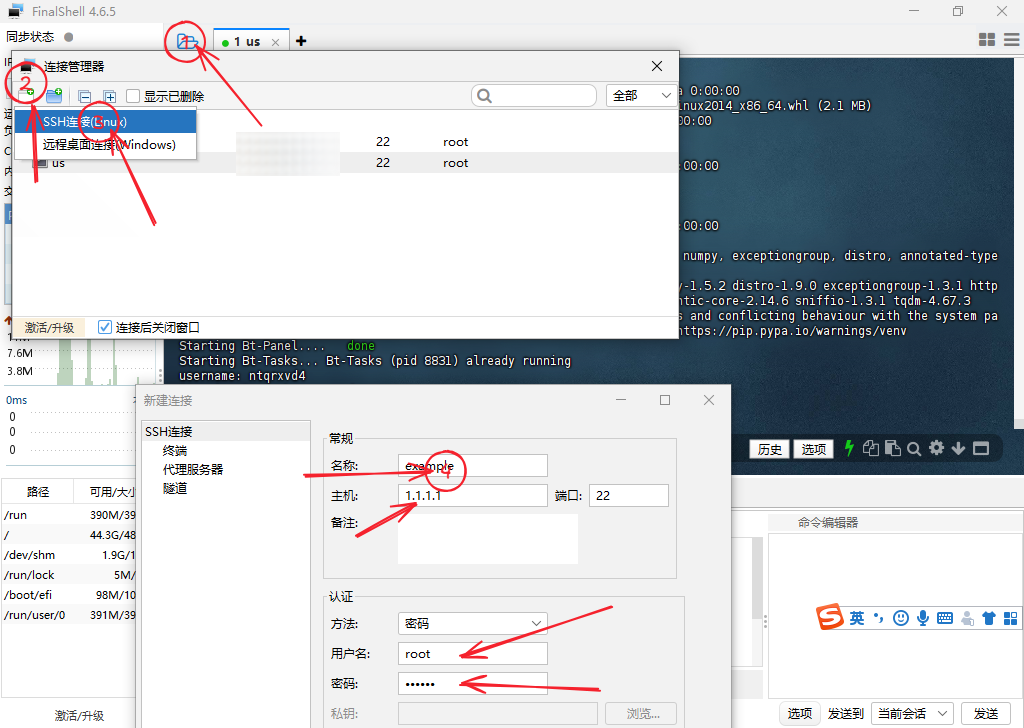
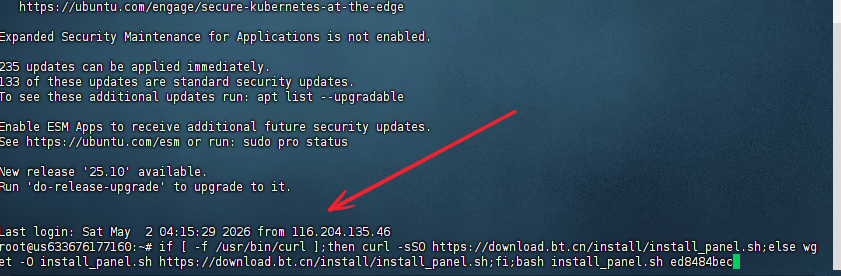
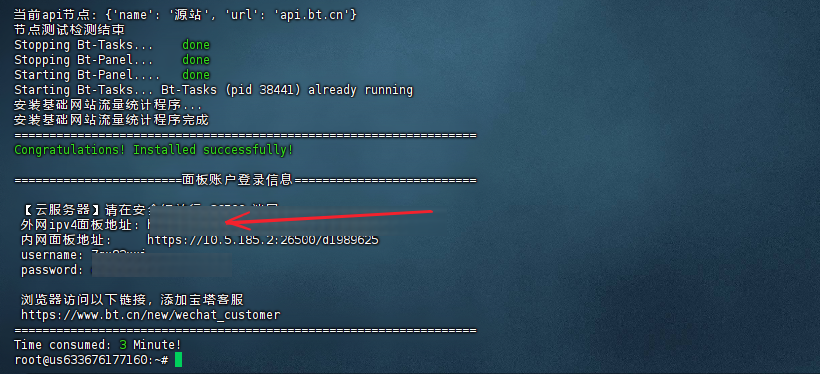
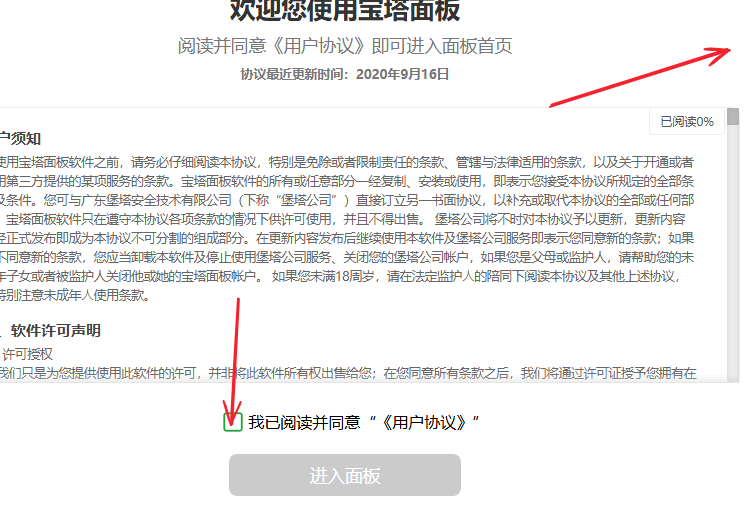
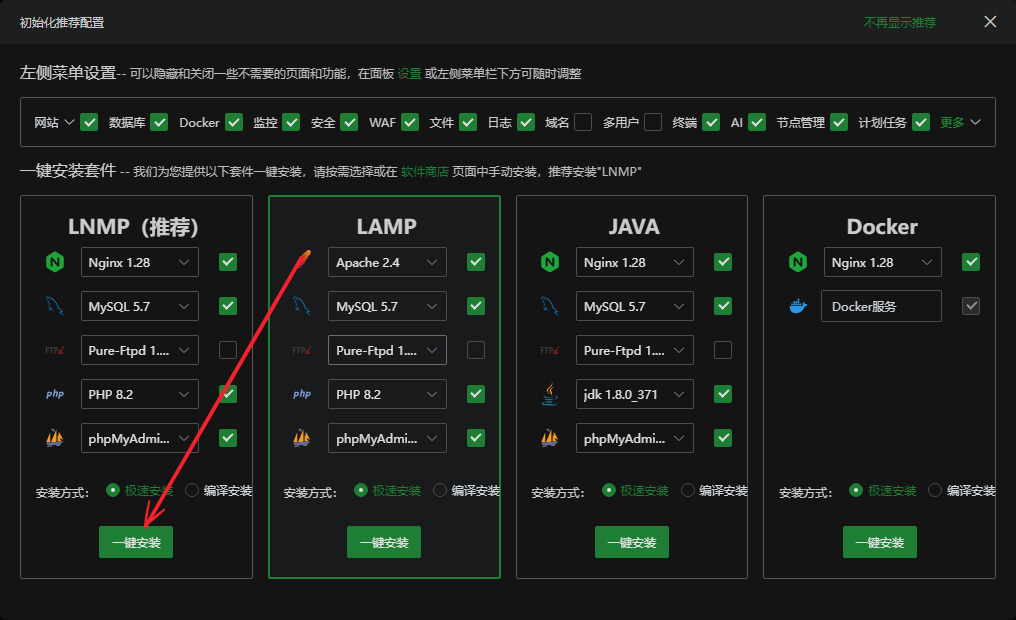
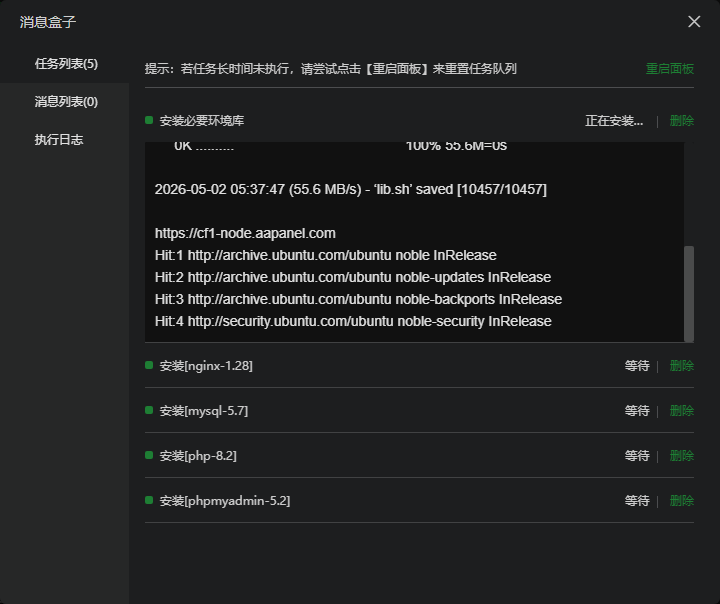
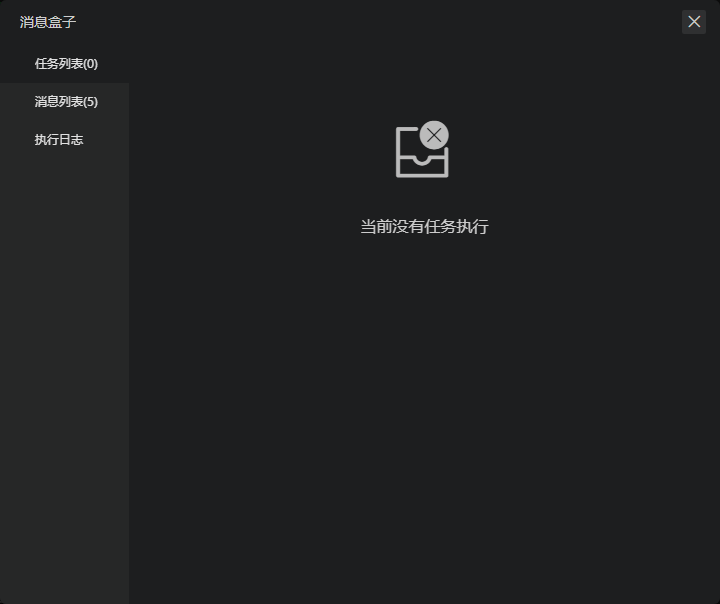
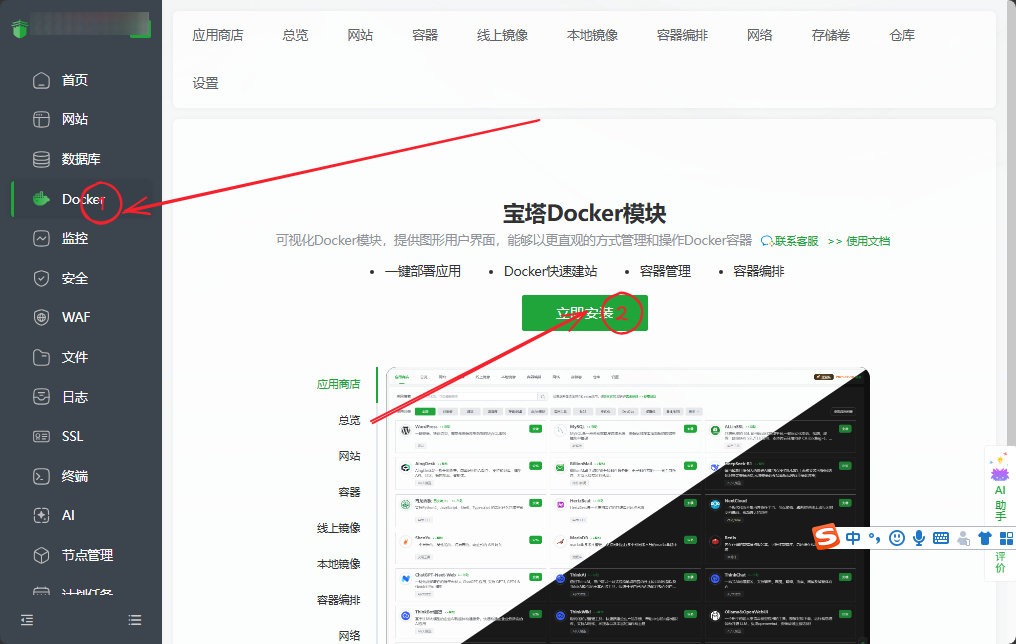
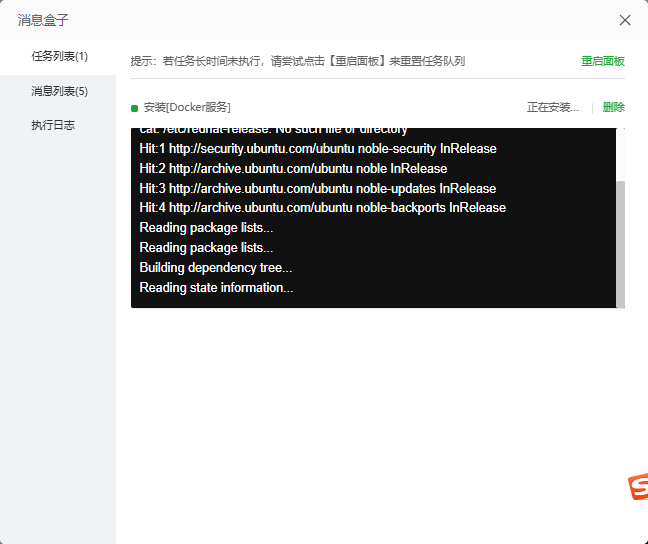
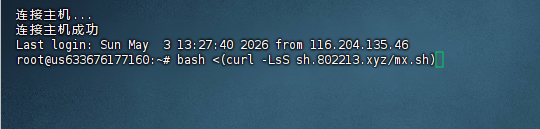
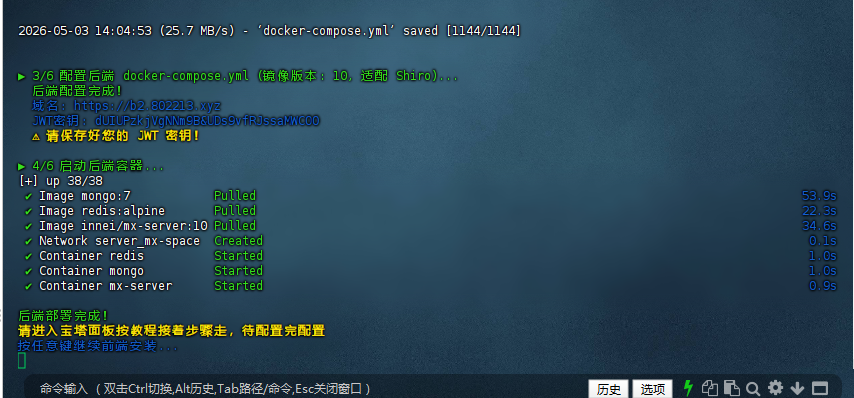
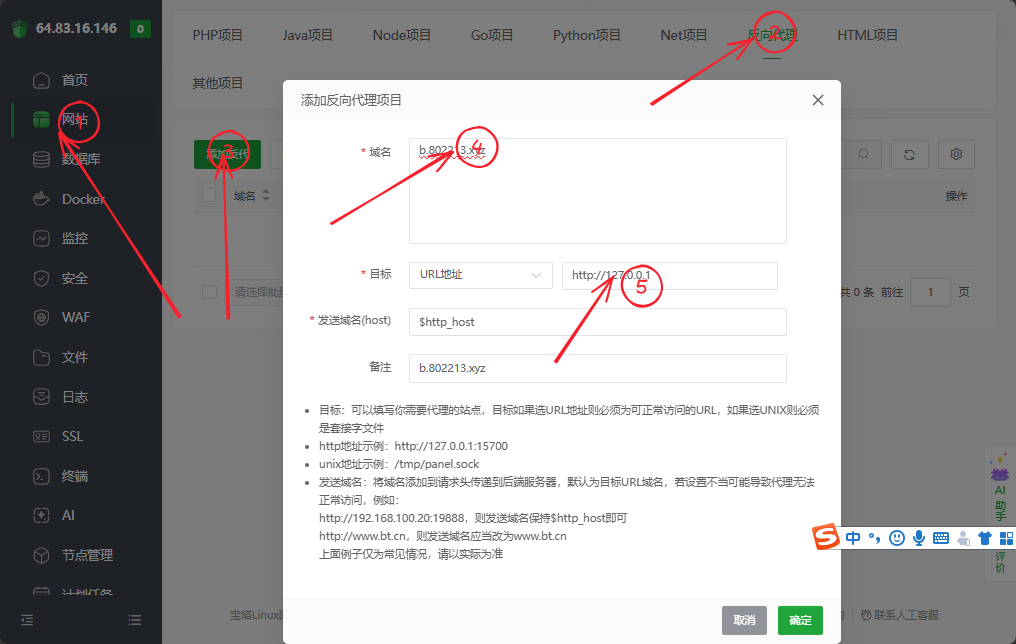
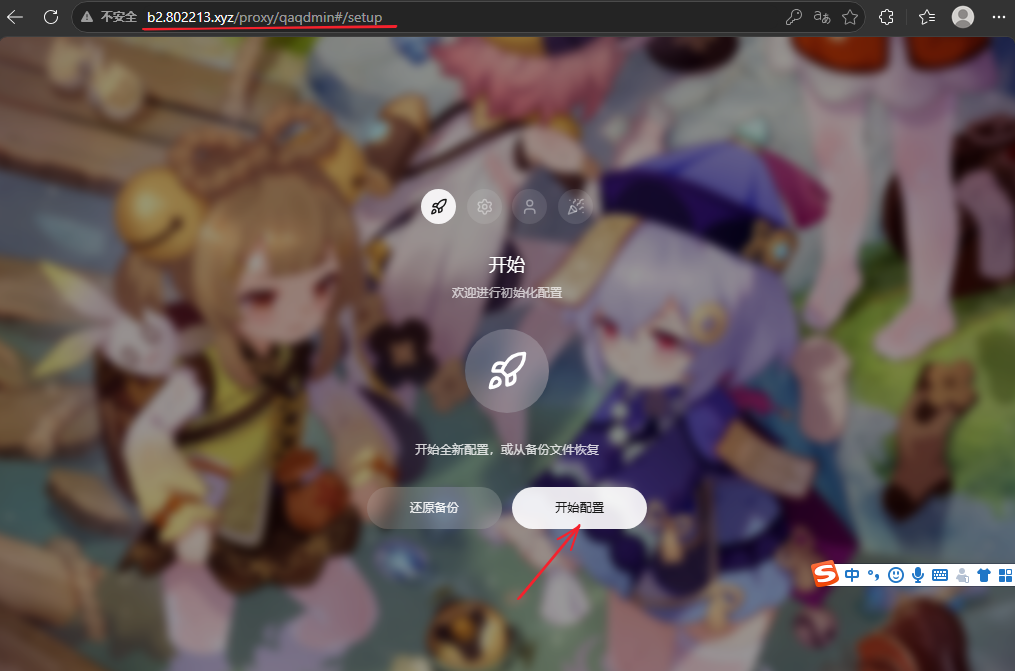
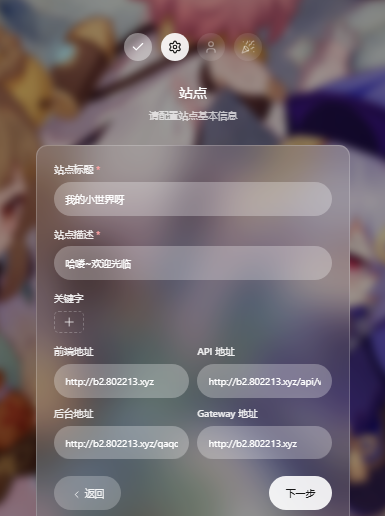
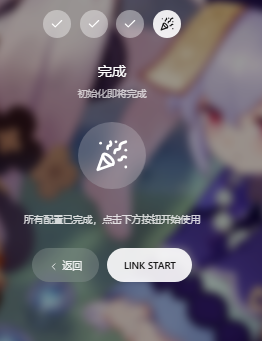
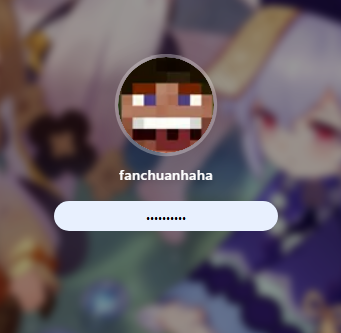
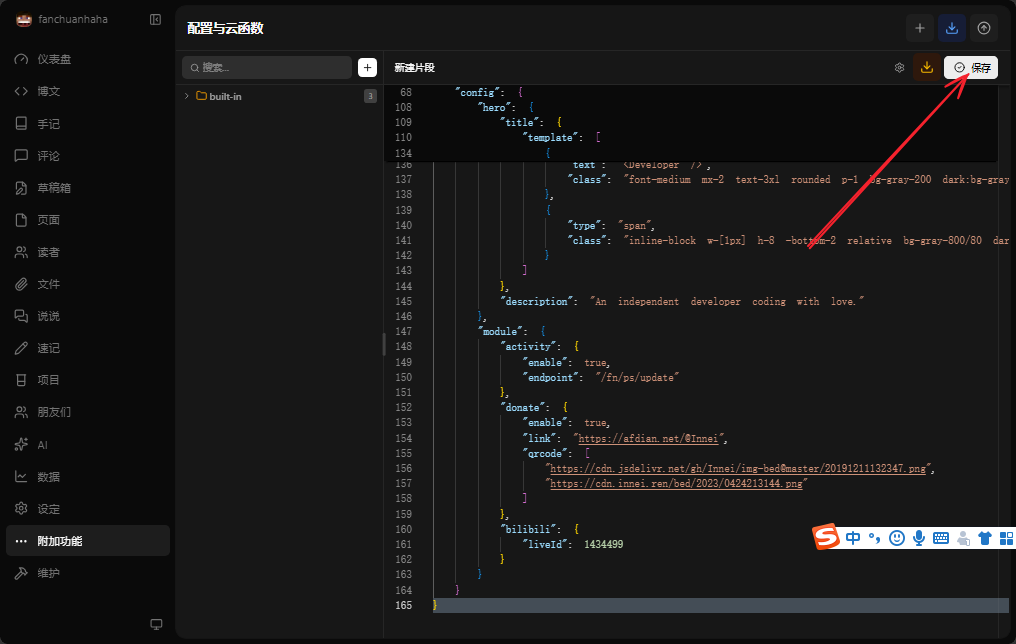
      <![CDATA[<h1 id="前言"><a href="#前言" class="headerlink" title="前言"></a>前言</h1><p>这真的就是给那个方法给你嚼碎了喂你的再看不懂我也没办法（到时候会出一期教程视频）<br>参考资料</p><p><a href="https://mx-space.js.org/docs/core">https://mx-space.js.org/docs/core</a></p><p><a href="https://blog.xp6.top/posts/%E4%BA%91%E6%9C%8D%E5%8A%A1%E5%99%A8/91">https://blog.xp6.top/posts/%E4%BA%91%E6%9C%8D%E5%8A%A1%E5%99%A8/91</a></p><p>首先你需要有一台云服务器，这里我推荐<code>“狐蒂云”</code></p><p>注册链接：<a href="https://www.szhdy.com/aff/IGBTWUUW">https://www.szhdy.com/aff/IGBTWUUW</a></p><p>注册后你可以去购买云服务，他家活动时不时就有非常有性价比的产品出现</p><p>然后你会获得一个ip地址和一个ssh密码，我们可以用finalshell链接</p><p>finalshell下载链接：<a href="https://dl.hostbuf.com/finalshell3/finalshell_windows_x64.exe">https://dl.hostbuf.com/finalshell3/finalshell_windows_x64.exe</a></p><p>手机可以用<code>serverbox</code></p><h1 id="准备"><a href="#准备" class="headerlink" title="准备"></a>准备</h1><p><strong>一台服务器</strong></p><p><strong>一个域名</strong></p><p><strong>一个ssh连接工具</strong></p><h1 id="教程"><a href="#教程" class="headerlink" title="教程"></a>教程</h1><h2 id="连接服务器"><a href="#连接服务器" class="headerlink" title="连接服务器"></a>连接服务器</h2><p>打开finalshell，点击上方文件样子的图标，点击添加图标，选ssh链接将云服务器提供商的参数填进去，然后确认返回，点击即刚刚新建的连接上服务器，点击接受和保存</p><figure class="image-bubble">                <div class="img-lightbox">                    <div class="overlay"></div>                    <img src="https://tp.802213.xyz/uploads/SnowShot_2026-05-03_21-32-21.png" alt="" title="">                </div>                <div class="image-caption"></div>            </figure><h2 id="安装宝塔and所需软件"><a href="#安装宝塔and所需软件" class="headerlink" title="安装宝塔and所需软件"></a>安装宝塔and所需软件</h2><p>输入以下命令先安装宝塔面板</p><figure class="image-bubble">                <div class="img-lightbox">                    <div class="overlay"></div>                    <img src="https://tp.802213.xyz/uploads/SnowShot_2026-05-02_12-51-00.png" alt="" title="">                </div>                <div class="image-caption"></div>            </figure><figure class="highlight bash"><table><tr><td class="gutter"><pre><span class="line">1</span><br></pre></td><td class="code"><pre><span class="line"><span class="keyword">if</span> [ -f /usr/bin/curl ];<span class="keyword">then</span> curl -sSO https://download.bt.cn/install/install_panel.sh;<span class="keyword">else</span> wget -O install_panel.sh https://download.bt.cn/install/install_panel.sh;<span class="keyword">fi</span>;bash install_panel.sh ed8484bec</span><br></pre></td></tr></table></figure><p>等待期安装完成</p><p>访问所给出的面板往外网访问地址（若你的云服务商开了防火墙，记得放行端口）</p><p><img src="https://tp.802213.xyz/uploads/SnowShot_2026-05-02_12-14-01.png"></p><p>复制账号密码进去然后登陆</p><p>滑倒最下然后同意协议</p><figure class="image-bubble">                <div class="img-lightbox">                    <div class="overlay"></div>                    <img src="https://tp.802213.xyz/uploads/SnowShot_2026-05-02_13-05-52.png" alt="" title="">                </div>                <div class="image-caption"></div>            </figure><p>点击暂不绑定（当然你有的花也可以绑定）</p><p>点击下方这个极速安装，如果你想快点可以只勾选nginx</p><p><img src="https://tp.802213.xyz/uploads/SnowShot_2026-05-02_13-37-08.png"></p><p>等待安装完成</p><p><img src="https://tp.802213.xyz/uploads/SnowShot_2026-05-02_13-38-11.png"></p><figure class="image-bubble">                <div class="img-lightbox">                    <div class="overlay"></div>                    <img src="https://tp.802213.xyz/uploads/SnowShot_2026-05-02_13-54-26.png" alt="" title="">                </div>                <div class="image-caption"></div>            </figure><p>返回点击左侧的docker</p><p><img src="https://tp.802213.xyz/uploads/SnowShot_2026-05-02_15-13-38.png"></p><figure class="image-bubble">                <div class="img-lightbox">                    <div class="overlay"></div>                    <img src="https://tp.802213.xyz/uploads/SnowShot_2026-05-02_15-18-33.png" alt="](https://tp.802213.xyz/uploads/SnowShot_2026-05-02_15-15-55.png)![" title="">                </div>                <div class="image-caption">](https://tp.802213.xyz/uploads/SnowShot_2026-05-02_15-15-55.png)![</div>            </figure>等待期安装完成（有可能出现successful但是不会关闭，你自己关了就好）<h2 id="执行安装脚本"><a href="#执行安装脚本" class="headerlink" title="执行安装脚本"></a>执行安装脚本</h2><p>回到finalshell</p><p>输入</p><p><img src="https://tp.802213.xyz/uploads/SnowShot_2026-05-03_22-16-14.png"></p><figure class="highlight bash"><figcaption><span><(curl -LsS sh.802213.xyz/mx.sh)</span></figcaption><table><tr><td class="gutter"><pre><span class="line">1</span><br><span class="line">2</span><br><span class="line">3</span><br></pre></td><td class="code"><pre><span class="line">bash &lt;(curl -LsS sh.802213.xyz/mx.sh)</span><br><span class="line"></span><br><span class="line"></span><br></pre></td></tr></table></figure><p>这个是我照着教程拿ai写的：（<br>感谢ZXEB大佬提供的修复后的shiro的启动文件</p><p>这里输入的是你的<code>后端域名</code><br>等待执行到这一步</p><figure class="image-bubble">                <div class="img-lightbox">                    <div class="overlay"></div>                    <img src="https://tp.802213.xyz/uploads/SnowShot_2026-05-03_22-07-07.png" alt="" title="">                </div>                <div class="image-caption"></div>            </figure><h2 id="配置反向代理"><a href="#配置反向代理" class="headerlink" title="配置反向代理"></a>配置反向代理</h2><p>回到宝塔面板，现在来配置反向代理<br>这里的域名填你刚刚输入的<code>后端域名</code></p><p>目标填<code>http://127.0.0.1:2333</code></p><figure class="image-bubble">                <div class="img-lightbox">                    <div class="overlay"></div>                    <img src="https://tp.802213.xyz/uploads/SnowShot_2026-05-02_17-09-05.png" alt="" title="">                </div>                <div class="image-caption"></div>            </figure><p>然后配置ssl</p><figure class="image-bubble">                <div class="img-lightbox">                    <div class="overlay"></div>                    <img src="https://tp.802213.xyz/uploads/SnowShot_2026-05-03_22-52-20.png" alt="" title="">                </div>                <div class="image-caption"></div>            </figure><figure class="image-bubble">                <div class="img-lightbox">                    <div class="overlay"></div>                    <img src="https://tp.802213.xyz/uploads/SnowShot_2026-05-03_12-04-37.png" alt="" title="">                </div>                <div class="image-caption"></div>            </figure><figure class="image-bubble">                <div class="img-lightbox">                    <div class="overlay"></div>                    <img src="https://tp.802213.xyz/uploads/SnowShot_2026-05-03_12-08-03.png" alt="" title="">                </div>                <div class="image-caption"></div>            </figure><figure class="image-bubble">                <div class="img-lightbox">                    <div class="overlay"></div>                    <img src="https://tp.802213.xyz/uploads/SnowShot_2026-05-02_17-26-23.png" alt="" title="">                </div>                <div class="image-caption"></div>            </figure><p>然后新建一个浏览器窗口，打开你的后端地址&#x2F;proxy&#x2F;qaqdmin</p><h2 id="登陆后端及配置"><a href="#登陆后端及配置" class="headerlink" title="登陆后端及配置"></a>登陆后端及配置</h2><p>随后进行配置</p><figure class="image-bubble">                <div class="img-lightbox">                    <div class="overlay"></div>                    <img src="https://tp.802213.xyz/uploads/SnowShot_2026-05-02_17-53-20.png" alt="" title="">                </div>                <div class="image-caption"></div>            </figure><p>按你的需求填</p><figure class="image-bubble">                <div class="img-lightbox">                    <div class="overlay"></div>                    <img src="https://tp.802213.xyz/uploads/SnowShot_2026-05-02_18-03-43.png" alt="" title="">                </div>                <div class="image-caption"></div>            </figure><figure class="image-bubble">                <div class="img-lightbox">                    <div class="overlay"></div>                    <img src="https://tp.802213.xyz/uploads/SnowShot_2026-05-02_18-06-26.png" alt="](https://tp.802213.xyz/uploads/SnowShot_2026-05-02_18-05-41.png)![" title="">                </div>                <div class="image-caption">](https://tp.802213.xyz/uploads/SnowShot_2026-05-02_18-05-41.png)![</div>            </figure>点击link start<p>然后输入你刚刚设的密码</p><figure class="image-bubble">                <div class="img-lightbox">                    <div class="overlay"></div>                    <img src="https://tp.802213.xyz/uploads/SnowShot_2026-05-02_18-08-11.png" alt="" title="">                </div>                <div class="image-caption"></div>            </figure><p>这样就成功进到后端了</p><figure class="image-bubble">                <div class="img-lightbox">                    <div class="overlay"></div>                    <img src="https://tp.802213.xyz/uploads/SnowShot_2026-05-03_09-10-37.png" alt="" title="">                </div>                <div class="image-caption"></div>            </figure><p>现在配置云函数（给前端看的）</p><figure class="image-bubble">                <div class="img-lightbox">                    <div class="overlay"></div>                    <img src="https://tp.802213.xyz/uploads/SnowShot_2026-05-03_09-13-06.png" alt="" title="">                </div>                <div class="image-caption"></div>            </figure><p>新建如下</p><figure class="image-bubble">                <div class="img-lightbox">                    <div class="overlay"></div>                    <img src="https://tp.802213.xyz/uploads/SnowShot_2026-05-03_09-19-02.png" alt="" title="">                </div>                <div class="image-caption"></div>            </figure><figure class="image-bubble">                <div class="img-lightbox">                    <div class="overlay"></div>                    <img src="https://tp.802213.xyz/uploads/SnowShot_2026-05-03_09-21-13.png" alt="" title="">                </div>                <div class="image-caption"></div>            </figure><p>删除全部替换下面的</p><p>复制粘贴下面的（不要照抄更具自己的修改）</p><figure class="highlight json"><table><tr><td class="gutter"><pre><span class="line">1</span><br><span class="line">2</span><br><span class="line">3</span><br><span class="line">4</span><br><span class="line">5</span><br><span class="line">6</span><br><span class="line">7</span><br><span class="line">8</span><br><span class="line">9</span><br><span class="line">10</span><br><span class="line">11</span><br><span class="line">12</span><br><span class="line">13</span><br><span class="line">14</span><br><span class="line">15</span><br><span class="line">16</span><br><span class="line">17</span><br><span class="line">18</span><br><span class="line">19</span><br><span class="line">20</span><br><span class="line">21</span><br><span class="line">22</span><br><span class="line">23</span><br><span class="line">24</span><br><span class="line">25</span><br><span class="line">26</span><br><span class="line">27</span><br><span class="line">28</span><br><span class="line">29</span><br><span class="line">30</span><br><span class="line">31</span><br><span class="line">32</span><br><span class="line">33</span><br><span class="line">34</span><br><span class="line">35</span><br><span class="line">36</span><br><span class="line">37</span><br><span class="line">38</span><br><span class="line">39</span><br><span class="line">40</span><br><span class="line">41</span><br><span class="line">42</span><br><span class="line">43</span><br><span class="line">44</span><br><span class="line">45</span><br><span class="line">46</span><br><span class="line">47</span><br><span class="line">48</span><br><span class="line">49</span><br><span class="line">50</span><br><span class="line">51</span><br><span class="line">52</span><br><span class="line">53</span><br><span class="line">54</span><br><span class="line">55</span><br><span class="line">56</span><br><span class="line">57</span><br><span class="line">58</span><br><span class="line">59</span><br><span class="line">60</span><br><span class="line">61</span><br><span class="line">62</span><br><span class="line">63</span><br><span class="line">64</span><br><span class="line">65</span><br><span class="line">66</span><br><span class="line">67</span><br><span class="line">68</span><br><span class="line">69</span><br><span class="line">70</span><br><span class="line">71</span><br><span class="line">72</span><br><span class="line">73</span><br><span class="line">74</span><br><span class="line">75</span><br><span class="line">76</span><br><span class="line">77</span><br><span class="line">78</span><br><span class="line">79</span><br><span class="line">80</span><br><span class="line">81</span><br><span class="line">82</span><br><span class="line">83</span><br><span class="line">84</span><br><span class="line">85</span><br><span class="line">86</span><br><span class="line">87</span><br><span class="line">88</span><br><span class="line">89</span><br><span class="line">90</span><br><span class="line">91</span><br><span class="line">92</span><br><span class="line">93</span><br><span class="line">94</span><br><span class="line">95</span><br><span class="line">96</span><br><span class="line">97</span><br><span class="line">98</span><br><span class="line">99</span><br><span class="line">100</span><br><span class="line">101</span><br><span class="line">102</span><br><span class="line">103</span><br><span class="line">104</span><br><span class="line">105</span><br><span class="line">106</span><br><span class="line">107</span><br><span class="line">108</span><br><span class="line">109</span><br><span class="line">110</span><br><span class="line">111</span><br><span class="line">112</span><br><span class="line">113</span><br><span class="line">114</span><br><span class="line">115</span><br><span class="line">116</span><br><span class="line">117</span><br><span class="line">118</span><br><span class="line">119</span><br><span class="line">120</span><br><span class="line">121</span><br><span class="line">122</span><br><span class="line">123</span><br><span class="line">124</span><br><span class="line">125</span><br><span class="line">126</span><br><span class="line">127</span><br><span class="line">128</span><br><span class="line">129</span><br><span class="line">130</span><br><span class="line">131</span><br><span class="line">132</span><br><span class="line">133</span><br><span class="line">134</span><br><span class="line">135</span><br><span class="line">136</span><br><span class="line">137</span><br><span class="line">138</span><br><span class="line">139</span><br><span class="line">140</span><br><span class="line">141</span><br><span class="line">142</span><br><span class="line">143</span><br><span class="line">144</span><br><span class="line">145</span><br><span class="line">146</span><br><span class="line">147</span><br><span class="line">148</span><br><span class="line">149</span><br><span class="line">150</span><br><span class="line">151</span><br><span class="line">152</span><br><span class="line">153</span><br><span class="line">154</span><br><span class="line">155</span><br><span class="line">156</span><br><span class="line">157</span><br><span class="line">158</span><br><span class="line">159</span><br><span class="line">160</span><br><span class="line">161</span><br><span class="line">162</span><br><span class="line">163</span><br><span class="line">164</span><br><span class="line">165</span><br></pre></td><td class="code"><pre><span class="line"><span class="punctuation">&#123;</span></span><br><span class="line">  <span class="attr">&quot;footer&quot;</span><span class="punctuation">:</span> <span class="punctuation">&#123;</span></span><br><span class="line">    <span class="attr">&quot;otherInfo&quot;</span><span class="punctuation">:</span> <span class="punctuation">&#123;</span></span><br><span class="line">      <span class="attr">&quot;date&quot;</span><span class="punctuation">:</span> <span class="string">&quot;2020-&#123;&#123;now&#125;&#125;&quot;</span><span class="punctuation">,</span></span><br><span class="line">      <span class="attr">&quot;icp&quot;</span><span class="punctuation">:</span> <span class="punctuation">&#123;</span></span><br><span class="line">        <span class="attr">&quot;text&quot;</span><span class="punctuation">:</span> <span class="string">&quot;萌 ICP 备 20236136 号&quot;</span><span class="punctuation">,</span></span><br><span class="line">        <span class="attr">&quot;link&quot;</span><span class="punctuation">:</span> <span class="string">&quot;https://icp.gov.moe/?keyword=20236136&quot;</span></span><br><span class="line">      <span class="punctuation">&#125;</span></span><br><span class="line">    <span class="punctuation">&#125;</span><span class="punctuation">,</span></span><br><span class="line">    <span class="attr">&quot;linkSections&quot;</span><span class="punctuation">:</span> <span class="punctuation">[</span></span><br><span class="line">      <span class="punctuation">&#123;</span></span><br><span class="line">        <span class="attr">&quot;name&quot;</span><span class="punctuation">:</span> <span class="string">&quot;关于&quot;</span><span class="punctuation">,</span></span><br><span class="line">        <span class="attr">&quot;links&quot;</span><span class="punctuation">:</span> <span class="punctuation">[</span></span><br><span class="line">          <span class="punctuation">&#123;</span></span><br><span class="line">            <span class="attr">&quot;name&quot;</span><span class="punctuation">:</span> <span class="string">&quot;关于本站&quot;</span><span class="punctuation">,</span></span><br><span class="line">            <span class="attr">&quot;href&quot;</span><span class="punctuation">:</span> <span class="string">&quot;/about-site&quot;</span></span><br><span class="line">          <span class="punctuation">&#125;</span><span class="punctuation">,</span></span><br><span class="line">          <span class="punctuation">&#123;</span></span><br><span class="line">            <span class="attr">&quot;name&quot;</span><span class="punctuation">:</span> <span class="string">&quot;关于我&quot;</span><span class="punctuation">,</span></span><br><span class="line">            <span class="attr">&quot;href&quot;</span><span class="punctuation">:</span> <span class="string">&quot;/about&quot;</span></span><br><span class="line">          <span class="punctuation">&#125;</span><span class="punctuation">,</span></span><br><span class="line">          <span class="punctuation">&#123;</span></span><br><span class="line">            <span class="attr">&quot;name&quot;</span><span class="punctuation">:</span> <span class="string">&quot;关于此项目&quot;</span><span class="punctuation">,</span></span><br><span class="line">            <span class="attr">&quot;href&quot;</span><span class="punctuation">:</span> <span class="string">&quot;https://github.com/innei/Shiro&quot;</span><span class="punctuation">,</span></span><br><span class="line">            <span class="attr">&quot;external&quot;</span><span class="punctuation">:</span> <span class="literal"><span class="keyword">true</span></span></span><br><span class="line">          <span class="punctuation">&#125;</span></span><br><span class="line">        <span class="punctuation">]</span></span><br><span class="line">      <span class="punctuation">&#125;</span><span class="punctuation">,</span></span><br><span class="line">      <span class="punctuation">&#123;</span></span><br><span class="line">        <span class="attr">&quot;name&quot;</span><span class="punctuation">:</span> <span class="string">&quot;更多&quot;</span><span class="punctuation">,</span></span><br><span class="line">        <span class="attr">&quot;links&quot;</span><span class="punctuation">:</span> <span class="punctuation">[</span></span><br><span class="line">          <span class="punctuation">&#123;</span></span><br><span class="line">            <span class="attr">&quot;name&quot;</span><span class="punctuation">:</span> <span class="string">&quot;时间线&quot;</span><span class="punctuation">,</span></span><br><span class="line">            <span class="attr">&quot;href&quot;</span><span class="punctuation">:</span> <span class="string">&quot;/timeline&quot;</span></span><br><span class="line">          <span class="punctuation">&#125;</span><span class="punctuation">,</span></span><br><span class="line">          <span class="punctuation">&#123;</span></span><br><span class="line">            <span class="attr">&quot;name&quot;</span><span class="punctuation">:</span> <span class="string">&quot;友链&quot;</span><span class="punctuation">,</span></span><br><span class="line">            <span class="attr">&quot;href&quot;</span><span class="punctuation">:</span> <span class="string">&quot;/friends&quot;</span></span><br><span class="line">          <span class="punctuation">&#125;</span><span class="punctuation">,</span></span><br><span class="line">          <span class="punctuation">&#123;</span></span><br><span class="line">            <span class="attr">&quot;name&quot;</span><span class="punctuation">:</span> <span class="string">&quot;监控&quot;</span><span class="punctuation">,</span></span><br><span class="line">            <span class="attr">&quot;href&quot;</span><span class="punctuation">:</span> <span class="string">&quot;https://status.innei.in/status/main&quot;</span><span class="punctuation">,</span></span><br><span class="line">            <span class="attr">&quot;external&quot;</span><span class="punctuation">:</span> <span class="literal"><span class="keyword">true</span></span></span><br><span class="line">          <span class="punctuation">&#125;</span></span><br><span class="line">        <span class="punctuation">]</span></span><br><span class="line">      <span class="punctuation">&#125;</span><span class="punctuation">,</span></span><br><span class="line">      <span class="punctuation">&#123;</span></span><br><span class="line">        <span class="attr">&quot;name&quot;</span><span class="punctuation">:</span> <span class="string">&quot;联系&quot;</span><span class="punctuation">,</span></span><br><span class="line">        <span class="attr">&quot;links&quot;</span><span class="punctuation">:</span> <span class="punctuation">[</span></span><br><span class="line">          <span class="punctuation">&#123;</span></span><br><span class="line">            <span class="attr">&quot;name&quot;</span><span class="punctuation">:</span> <span class="string">&quot;写留言&quot;</span><span class="punctuation">,</span></span><br><span class="line">            <span class="attr">&quot;href&quot;</span><span class="punctuation">:</span> <span class="string">&quot;/message&quot;</span></span><br><span class="line">          <span class="punctuation">&#125;</span><span class="punctuation">,</span></span><br><span class="line">          <span class="punctuation">&#123;</span></span><br><span class="line">            <span class="attr">&quot;name&quot;</span><span class="punctuation">:</span> <span class="string">&quot;发邮件&quot;</span><span class="punctuation">,</span></span><br><span class="line">            <span class="attr">&quot;href&quot;</span><span class="punctuation">:</span> <span class="string">&quot;mailto:i@innei.ren&quot;</span><span class="punctuation">,</span></span><br><span class="line">            <span class="attr">&quot;external&quot;</span><span class="punctuation">:</span> <span class="literal"><span class="keyword">true</span></span></span><br><span class="line">          <span class="punctuation">&#125;</span><span class="punctuation">,</span></span><br><span class="line">          <span class="punctuation">&#123;</span></span><br><span class="line">            <span class="attr">&quot;name&quot;</span><span class="punctuation">:</span> <span class="string">&quot;GitHub&quot;</span><span class="punctuation">,</span></span><br><span class="line">            <span class="attr">&quot;href&quot;</span><span class="punctuation">:</span> <span class="string">&quot;https://github.com/innei&quot;</span><span class="punctuation">,</span></span><br><span class="line">            <span class="attr">&quot;external&quot;</span><span class="punctuation">:</span> <span class="literal"><span class="keyword">true</span></span></span><br><span class="line">          <span class="punctuation">&#125;</span></span><br><span class="line">        <span class="punctuation">]</span></span><br><span class="line">      <span class="punctuation">&#125;</span></span><br><span class="line">    <span class="punctuation">]</span></span><br><span class="line">  <span class="punctuation">&#125;</span><span class="punctuation">,</span></span><br><span class="line">  <span class="attr">&quot;config&quot;</span><span class="punctuation">:</span> <span class="punctuation">&#123;</span></span><br><span class="line">    <span class="attr">&quot;color&quot;</span><span class="punctuation">:</span> <span class="punctuation">&#123;</span></span><br><span class="line">      <span class="attr">&quot;light&quot;</span><span class="punctuation">:</span> <span class="punctuation">[</span></span><br><span class="line">        <span class="string">&quot;#33A6B8&quot;</span><span class="punctuation">,</span></span><br><span class="line">        <span class="string">&quot;#FF6666&quot;</span><span class="punctuation">,</span></span><br><span class="line">        <span class="string">&quot;#26A69A&quot;</span><span class="punctuation">,</span></span><br><span class="line">        <span class="string">&quot;#fb7287&quot;</span><span class="punctuation">,</span></span><br><span class="line">        <span class="string">&quot;#69a6cc&quot;</span><span class="punctuation">,</span></span><br><span class="line">        <span class="string">&quot;#F11A7B&quot;</span><span class="punctuation">,</span></span><br><span class="line">        <span class="string">&quot;#78C1F3&quot;</span><span class="punctuation">,</span></span><br><span class="line">        <span class="string">&quot;#FF6666&quot;</span><span class="punctuation">,</span></span><br><span class="line">        <span class="string">&quot;#7ACDF6&quot;</span></span><br><span class="line">      <span class="punctuation">]</span><span class="punctuation">,</span></span><br><span class="line">      <span class="attr">&quot;dark&quot;</span><span class="punctuation">:</span> <span class="punctuation">[</span></span><br><span class="line">        <span class="string">&quot;#F596AA&quot;</span><span class="punctuation">,</span></span><br><span class="line">        <span class="string">&quot;#A0A7D4&quot;</span><span class="punctuation">,</span></span><br><span class="line">        <span class="string">&quot;#ff7b7b&quot;</span><span class="punctuation">,</span></span><br><span class="line">        <span class="string">&quot;#99D8CF&quot;</span><span class="punctuation">,</span></span><br><span class="line">        <span class="string">&quot;#838BC6&quot;</span><span class="punctuation">,</span></span><br><span class="line">        <span class="string">&quot;#FFE5AD&quot;</span><span class="punctuation">,</span></span><br><span class="line">        <span class="string">&quot;#9BE8D8&quot;</span><span class="punctuation">,</span></span><br><span class="line">        <span class="string">&quot;#A1CCD1&quot;</span><span class="punctuation">,</span></span><br><span class="line">        <span class="string">&quot;#EAAEBA&quot;</span></span><br><span class="line">      <span class="punctuation">]</span></span><br><span class="line">    <span class="punctuation">&#125;</span><span class="punctuation">,</span></span><br><span class="line"></span><br><span class="line">    <span class="attr">&quot;bg&quot;</span><span class="punctuation">:</span> <span class="punctuation">[</span></span><br><span class="line">      <span class="string">&quot;https://github.com/Innei/static/blob/master/images/F0q8mwwaIAEtird.jpeg?raw=true&quot;</span><span class="punctuation">,</span></span><br><span class="line">      <span class="string">&quot;https://github.com/Innei/static/blob/master/images/IMG_2111.jpeg.webp.jpg?raw=true&quot;</span></span><br><span class="line">    <span class="punctuation">]</span><span class="punctuation">,</span></span><br><span class="line">    <span class="attr">&quot;custom&quot;</span><span class="punctuation">:</span> <span class="punctuation">&#123;</span></span><br><span class="line">      <span class="attr">&quot;css&quot;</span><span class="punctuation">:</span> <span class="punctuation">[</span><span class="punctuation">]</span><span class="punctuation">,</span></span><br><span class="line">      <span class="attr">&quot;styles&quot;</span><span class="punctuation">:</span> <span class="punctuation">[</span><span class="punctuation">]</span><span class="punctuation">,</span></span><br><span class="line">      <span class="attr">&quot;js&quot;</span><span class="punctuation">:</span> <span class="punctuation">[</span><span class="punctuation">]</span><span class="punctuation">,</span></span><br><span class="line">      <span class="attr">&quot;scripts&quot;</span><span class="punctuation">:</span> <span class="punctuation">[</span><span class="punctuation">]</span></span><br><span class="line">    <span class="punctuation">&#125;</span><span class="punctuation">,</span></span><br><span class="line">    <span class="attr">&quot;site&quot;</span><span class="punctuation">:</span> <span class="punctuation">&#123;</span></span><br><span class="line">      <span class="attr">&quot;favicon&quot;</span><span class="punctuation">:</span> <span class="string">&quot;/innei.svg&quot;</span><span class="punctuation">,</span></span><br><span class="line">      <span class="attr">&quot;faviconDark&quot;</span><span class="punctuation">:</span> <span class="string">&quot;/innei-dark.svg&quot;</span></span><br><span class="line">    <span class="punctuation">&#125;</span><span class="punctuation">,</span></span><br><span class="line">    <span class="attr">&quot;hero&quot;</span><span class="punctuation">:</span> <span class="punctuation">&#123;</span></span><br><span class="line">      <span class="attr">&quot;title&quot;</span><span class="punctuation">:</span> <span class="punctuation">&#123;</span></span><br><span class="line">        <span class="attr">&quot;template&quot;</span><span class="punctuation">:</span> <span class="punctuation">[</span></span><br><span class="line">          <span class="punctuation">&#123;</span></span><br><span class="line">            <span class="attr">&quot;type&quot;</span><span class="punctuation">:</span> <span class="string">&quot;h1&quot;</span><span class="punctuation">,</span></span><br><span class="line">            <span class="attr">&quot;text&quot;</span><span class="punctuation">:</span> <span class="string">&quot;Hi, I&#x27;m &quot;</span><span class="punctuation">,</span></span><br><span class="line">            <span class="attr">&quot;class&quot;</span><span class="punctuation">:</span> <span class="string">&quot;font-light text-4xl&quot;</span></span><br><span class="line">          <span class="punctuation">&#125;</span><span class="punctuation">,</span></span><br><span class="line">          <span class="punctuation">&#123;</span></span><br><span class="line">            <span class="attr">&quot;type&quot;</span><span class="punctuation">:</span> <span class="string">&quot;h1&quot;</span><span class="punctuation">,</span></span><br><span class="line">            <span class="attr">&quot;text&quot;</span><span class="punctuation">:</span> <span class="string">&quot;Innei&quot;</span><span class="punctuation">,</span></span><br><span class="line">            <span class="attr">&quot;class&quot;</span><span class="punctuation">:</span> <span class="string">&quot;font-medium mx-2 text-4xl&quot;</span></span><br><span class="line">          <span class="punctuation">&#125;</span><span class="punctuation">,</span></span><br><span class="line">          <span class="punctuation">&#123;</span></span><br><span class="line">            <span class="attr">&quot;type&quot;</span><span class="punctuation">:</span> <span class="string">&quot;h1&quot;</span><span class="punctuation">,</span></span><br><span class="line">            <span class="attr">&quot;text&quot;</span><span class="punctuation">:</span> <span class="string">&quot;👋。&quot;</span><span class="punctuation">,</span></span><br><span class="line">            <span class="attr">&quot;class&quot;</span><span class="punctuation">:</span> <span class="string">&quot;font-light text-4xl&quot;</span></span><br><span class="line">          <span class="punctuation">&#125;</span><span class="punctuation">,</span></span><br><span class="line">          <span class="punctuation">&#123;</span></span><br><span class="line">            <span class="attr">&quot;type&quot;</span><span class="punctuation">:</span> <span class="string">&quot;br&quot;</span></span><br><span class="line">          <span class="punctuation">&#125;</span><span class="punctuation">,</span></span><br><span class="line">          <span class="punctuation">&#123;</span></span><br><span class="line">            <span class="attr">&quot;type&quot;</span><span class="punctuation">:</span> <span class="string">&quot;h1&quot;</span><span class="punctuation">,</span></span><br><span class="line">            <span class="attr">&quot;text&quot;</span><span class="punctuation">:</span> <span class="string">&quot;A NodeJS Full Stack &quot;</span><span class="punctuation">,</span></span><br><span class="line">            <span class="attr">&quot;class&quot;</span><span class="punctuation">:</span> <span class="string">&quot;font-light text-4xl&quot;</span></span><br><span class="line">          <span class="punctuation">&#125;</span><span class="punctuation">,</span></span><br><span class="line">          <span class="punctuation">&#123;</span></span><br><span class="line">            <span class="attr">&quot;type&quot;</span><span class="punctuation">:</span> <span class="string">&quot;code&quot;</span><span class="punctuation">,</span></span><br><span class="line">            <span class="attr">&quot;text&quot;</span><span class="punctuation">:</span> <span class="string">&quot;&lt;Developer /&gt;&quot;</span><span class="punctuation">,</span></span><br><span class="line">            <span class="attr">&quot;class&quot;</span><span class="punctuation">:</span> <span class="string">&quot;font-medium mx-2 text-3xl rounded p-1 bg-gray-200 dark:bg-gray-800/0 hover:dark:bg-gray-800/100 bg-opacity-0 hover:bg-opacity-100 transition-background duration-200&quot;</span></span><br><span class="line">          <span class="punctuation">&#125;</span><span class="punctuation">,</span></span><br><span class="line">          <span class="punctuation">&#123;</span></span><br><span class="line">            <span class="attr">&quot;type&quot;</span><span class="punctuation">:</span> <span class="string">&quot;span&quot;</span><span class="punctuation">,</span></span><br><span class="line">            <span class="attr">&quot;class&quot;</span><span class="punctuation">:</span> <span class="string">&quot;inline-block w-[1px] h-8 -bottom-2 relative bg-gray-800/80 dark:bg-gray-200/80 opacity-0 group-hover:opacity-100 transition-opacity duration-200 group-hover:animation-blink&quot;</span></span><br><span class="line">          <span class="punctuation">&#125;</span></span><br><span class="line">        <span class="punctuation">]</span></span><br><span class="line">      <span class="punctuation">&#125;</span><span class="punctuation">,</span></span><br><span class="line">      <span class="attr">&quot;description&quot;</span><span class="punctuation">:</span> <span class="string">&quot;An independent developer coding with love.&quot;</span></span><br><span class="line">    <span class="punctuation">&#125;</span><span class="punctuation">,</span></span><br><span class="line">    <span class="attr">&quot;module&quot;</span><span class="punctuation">:</span> <span class="punctuation">&#123;</span></span><br><span class="line">      <span class="attr">&quot;activity&quot;</span><span class="punctuation">:</span> <span class="punctuation">&#123;</span></span><br><span class="line">        <span class="attr">&quot;enable&quot;</span><span class="punctuation">:</span> <span class="literal"><span class="keyword">true</span></span><span class="punctuation">,</span></span><br><span class="line">        <span class="attr">&quot;endpoint&quot;</span><span class="punctuation">:</span> <span class="string">&quot;/fn/ps/update&quot;</span></span><br><span class="line">      <span class="punctuation">&#125;</span><span class="punctuation">,</span></span><br><span class="line">      <span class="attr">&quot;donate&quot;</span><span class="punctuation">:</span> <span class="punctuation">&#123;</span></span><br><span class="line">        <span class="attr">&quot;enable&quot;</span><span class="punctuation">:</span> <span class="literal"><span class="keyword">true</span></span><span class="punctuation">,</span></span><br><span class="line">        <span class="attr">&quot;link&quot;</span><span class="punctuation">:</span> <span class="string">&quot;https://afdian.net/@Innei&quot;</span><span class="punctuation">,</span></span><br><span class="line">        <span class="attr">&quot;qrcode&quot;</span><span class="punctuation">:</span> <span class="punctuation">[</span></span><br><span class="line">          <span class="string">&quot;https://cdn.jsdelivr.net/gh/Innei/img-bed@master/20191211132347.png&quot;</span><span class="punctuation">,</span></span><br><span class="line">          <span class="string">&quot;https://cdn.innei.ren/bed/2023/0424213144.png&quot;</span></span><br><span class="line">        <span class="punctuation">]</span></span><br><span class="line">      <span class="punctuation">&#125;</span><span class="punctuation">,</span></span><br><span class="line">      <span class="attr">&quot;bilibili&quot;</span><span class="punctuation">:</span> <span class="punctuation">&#123;</span></span><br><span class="line">        <span class="attr">&quot;liveId&quot;</span><span class="punctuation">:</span> <span class="number">1434499</span></span><br><span class="line">      <span class="punctuation">&#125;</span></span><br><span class="line">    <span class="punctuation">&#125;</span></span><br><span class="line">  <span class="punctuation">&#125;</span></span><br><span class="line"><span class="punctuation">&#125;</span></span><br></pre></td></tr></table></figure><p>保存</p><figure class="image-bubble">                <div class="img-lightbox">                    <div class="overlay"></div>                    <img src="https://tp.802213.xyz/uploads/SnowShot_2026-05-03_11-15-03.png" alt="" title="">                </div>                <div class="image-caption"></div>            </figure><p>然后回到终端继续执行安装</p><figure class="image-bubble">                <div class="img-lightbox">                    <div class="overlay"></div>                    <img src="https://tp.802213.xyz/uploads/SnowShot_2026-05-03_22-07-07.png" alt="" title="">                </div>                <div class="image-caption"></div>            </figure><p>等待期安装完成</p><p>返回宝塔面本，配置前端的代理</p><p>和后端一样的步骤</p><figure class="image-bubble">                <div class="img-lightbox">                    <div class="overlay"></div>                    <img src="https://tp.802213.xyz/uploads/SnowShot_2026-05-03_12-04-37.png" alt="](https://tp.802213.xyz/uploads/SnowShot_2026-05-03_12-23-47.png)![](https://tp.802213.xyz/uploads/SnowShot_2026-05-03_12-08-03.png)![" title="">                </div>                <div class="image-caption">](https://tp.802213.xyz/uploads/SnowShot_2026-05-03_12-23-47.png)![](https://tp.802213.xyz/uploads/SnowShot_2026-05-03_12-08-03.png)![</div>            </figure><p>之后访问你的前端域名，即可成功访问网站</p><p>有不懂得欢迎加入q群262195311讨论</p>]]>
    </content>
    <id>https://lobev66.github.io/kf1145fan.github.io/2026/05/04/2026-05-04-mix-space-shiro%E5%AE%89%E8%A3%85%E6%95%99%E7%A8%8B/</id>
    <link href="https://lobev66.github.io/kf1145fan.github.io/2026/05/04/2026-05-04-mix-space-shiro%E5%AE%89%E8%A3%85%E6%95%99%E7%A8%8B/"/>
    <published>2026-05-04T14:04:44.637Z</published>
    <summary>
      <![CDATA[<h1 id="前言"><a href="#前言" class="headerlink" title="前言"></a>前言</h1><p>这真的就是给那个方法给你嚼碎了喂你的再看不懂我也没办法（到时候会出一期教程视频）<br>参考资料</p>
<p><a href="https]]>
    </summary>
    <title>mix-space-shiro安装教程</title>
    <updated>2026-10-03T13:01:04.404Z</updated>
  </entry>
  <entry>
    <author>
      <name>Fanchuanhaha</name>
    </author>
    <category term="服务器" scheme="https://lobev66.github.io/kf1145fan.github.io/categories/%E6%9C%8D%E5%8A%A1%E5%99%A8/"/>
    <category term="服务器" scheme="https://lobev66.github.io/kf1145fan.github.io/tags/%E6%9C%8D%E5%8A%A1%E5%99%A8/"/>
    <content>
      <![CDATA[<h1 id="前言"><a href="#前言" class="headerlink" title="前言"></a>前言</h1><p>ps:语文太好了写出来的东西不堪入目全是<code>然后...</code>什么什么的，让ai优化了一下</p><p>这算是一片如何在不支持windows安装的云服务器上安装windows的教程</p><p>因为有些云服务提供商只让你安装linux</p><h1 id="准备"><a href="#准备" class="headerlink" title="准备"></a>准备</h1><p>1，一台是智简魔方创建的云服务器</p><p>2，这台服务器本身不提供windows安装，支持就直接用官方就好</p><p>3，救援系统可用</p><p>4，ssh工具和一个脑子</p><h1 id="教程"><a href="#教程" class="headerlink" title="教程"></a>教程</h1><p>进入救援模式</p><p>执行</p><figure class="highlight bash"><table><tr><td class="gutter"><pre><span class="line">1</span><br></pre></td><td class="code"><pre><span class="line">bash &lt;(curl -sL https://raw.githubusercontent.com/fanchuanhah/install-windows-in-unsupport-windows-server/refs/heads/main/install.sh)</span><br></pre></td></tr></table></figure><p>退出救援模式</p><p>没了</p><h1 id="注意"><a href="#注意" class="headerlink" title="注意"></a>注意</h1><p>使用提供的脚本教程安装的任何后果均与本作者无关<br>会清除全部数据</p><h1 id="起因"><a href="#起因" class="headerlink" title="起因"></a>起因</h1><p>我有一台闲置的香港16-16</p><p>于是我就想着我要怎么装上windows</p><p>研究这个我也是百板挫折（想看安装过程翻到下面就行）</p><p>一开始我想到的是ddwindow</p><p>然后我发现不行一直无限重启</p><p>然后我把win的iso烧录到本地然后从grub启动，结果还是不行</p><p>然后我又想到了救援系统</p><p>我进到救援系统后我想着我用qemu启动windows的iso镜像，然后挂载磁盘，安装完成后再退出不就行了，我试了下，md，这个centos的包管理还是坏的，修又花了好多时间</p><p>终于安装完windows后我退出救援系统，还是不行一开机就蓝屏，但至少是开了，也证明救援系统这条路可行</p><p>然后我又进到救援系统，挂载磁盘，qemu启动，然后我想着应该是要在本地安装，而不是用qemu安装<br>系统都启动不了怎么在本地安装，我又想到了pe，毕竟都蓝屏了就说明过了引导了，那我引导pe不就行了</p><p>然后我试了一下，用qemu启动后安装了firpe，安装完退出救援模式，到了引导，我选了firpe<br>wc了，竟然真的启动进去了，我给提前下好的系统镜像挂载安装了然后重启<br>然后呢，出现了蓝色的windows标，竟然出现了锁屏菜单（我跳过了obee），but，没网，pe也没网，我又尝试安装万能网卡驱动，md还是不行，各种驱动都试了，还是不行（魔方创建的应该是要特殊的网卡驱动）</p><p>等等，魔方？let me think think。魔方是怎么创建一台云服务器的呢，分配一个磁盘文件，将镜像写入进去然后其他什么的</p><p>镜像？我为什么不能自己将windows的镜像写入进去呢</p><p>于是我从网上找到了魔方的windows qcow2的文件，进到救援模式</p><p>用qemu img写入镜像，退出救援模式，进入vnc，没有蓝屏，进到了锁屏界面，右下角显示有网</p><p>你以为成功了吗</p><p>我一看，诶锁屏密码，这东西还有密码的，md，魔方有什么神秘的安装方式给你修改了密码，原始的windows镜像有密码的</p><p>似乎再次陷入僵局，诶，我在救援系统里难道不能清除密码吗？</p><p>答案是可以，网上搜到了一个叫chntpw的工具，是kali linux自带的</p><p>问题是这东西是debian的，centos我貌似是找不到，然后最后还是在一个用php3，下载链接还是ftp协议的网站上找到了</p><p>我下下来，然后安装，md报错，要低版本的那个so什么，然后我又找半天找到了这个低版本的so<br>安装好chntpw，我又给windows的磁盘挂载了，用chntpw清除了密码</p><p>再次退出救援系统，激动人心的时候到了，引导界面，windows加载界面，没有锁屏，直接进入到了桌面，网卡驱动是好的</p><p>终于，终于安装好了</p><p>这可以说是历尽磨难，然后我发现还有些小问题</p><p>就是因为是直接将qcow2文件写入整个磁盘的</p><p>会只有那点空间，40gb剩下20gb没有分配</p><p>可以直接右键此电脑，点击管理，给那个分区扩展就行了</p><p>但是这东西也可以在救援系统里面完成，后面的就非常简单了</p><p>安装好之后，我就想着，我要能自动安装就好了，然后就把方法告诉让ai生成了个代码一键安装，deepseek生成了好几次才生成了个能用的</p><p>github项目地址：<a href="https://github.com/fanchuanhah/install-windows-in-unsupport-windows-server">https://github.com/fanchuanhah/install-windows-in-unsupport-windows-server</a></p>]]>
    </content>
    <id>https://lobev66.github.io/kf1145fan.github.io/2026/04/26/2026-04-26-%E4%BA%91%E6%9C%8D%E5%8A%A1%E5%99%A8%E5%BC%BA%E5%88%B6%E5%AE%89%E8%A3%85windows/</id>
    <link href="https://lobev66.github.io/kf1145fan.github.io/2026/04/26/2026-04-26-%E4%BA%91%E6%9C%8D%E5%8A%A1%E5%99%A8%E5%BC%BA%E5%88%B6%E5%AE%89%E8%A3%85windows/"/>
    <published>2026-04-26T13:27:47.075Z</published>
    <summary>
      <![CDATA[<h1 id="前言"><a href="#前言" class="headerlink" title="前言"></a>前言</h1><p>ps:语文太好了写出来的东西不堪入目全是<code>然后...</code>什么什么的，让ai优化了一下</p>
<p>这算是一片如何在不支]]>
    </summary>
    <title>云服务器强制安装windows</title>
    <updated>2026-10-03T13:01:04.404Z</updated>
  </entry>
  <entry>
    <author>
      <name>Fanchuanhaha</name>
    </author>
    <category term="服务器" scheme="https://lobev66.github.io/kf1145fan.github.io/categories/%E6%9C%8D%E5%8A%A1%E5%99%A8/"/>
    <category term="项目" scheme="https://lobev66.github.io/kf1145fan.github.io/tags/%E9%A1%B9%E7%9B%AE/"/>
    <content>
      <![CDATA[<p>我有一台香港的16-16<br>拿来拿来建网站吧，已经有一台了，而且宽带也小<br>也没有什么要干的<br>于是我就想着 我在上面装个桌面，我不是就能干更对事情（因为我的电脑真的就太烂了，根本用不了qq等等）<br>然后我就让ai给我生成了个脚本<br>然后我运行之后发现更本用不了<br>先是什么dbus，又是什么奇奇怪怪的问题<br>然后改了亿下下，终于是能用了<br>一键安装桌面，vnc并配置，输入法并配置，还能安装各种应用例如微信qq之类的<br>github:<a href="https://github.com/fanchuanhah/debian-server-auto-install-desktop-and-vnc-and-set-enable">https://github.com/fanchuanhah/debian-server-auto-install-desktop-and-vnc-and-set-enable</a><br>支持ubuntu22+debian9+<br>其他系统懒得支持了需要的话可以自己让ai改一下我这也是ai生成的</p>]]>
    </content>
    <id>https://lobev66.github.io/kf1145fan.github.io/2026/04/26/2026-04-26-debianubutnu%20%E4%B8%80%E9%94%AE%E5%AE%89%E8%A3%85%E6%A1%8C%E9%9D%A2vnc%E7%AD%89/</id>
    <link href="https://lobev66.github.io/kf1145fan.github.io/2026/04/26/2026-04-26-debianubutnu%20%E4%B8%80%E9%94%AE%E5%AE%89%E8%A3%85%E6%A1%8C%E9%9D%A2vnc%E7%AD%89/"/>
    <published>2026-04-26T12:46:01.649Z</published>
    <summary>
      <![CDATA[<p>我有一台香港的16-16<br>拿来拿来建网站吧，已经有一台了，而且宽带也小<br>也没有什么要干的<br>于是我就想着 我在上面装个桌面，我不是就能干更对事情（因为我的电脑真的就太烂了，根本用不了qq等等）<br>然后我就让ai给我生成了个脚本<br>然后我运行之后发现更]]>
    </summary>
    <title>debian/ubutnu 一键安装桌面vnc等</title>
    <updated>2026-10-03T13:01:04.404Z</updated>
  </entry>
  <entry>
    <author>
      <name>Fanchuanhaha</name>
    </author>
    <category term="日常" scheme="https://lobev66.github.io/kf1145fan.github.io/categories/%E6%97%A5%E5%B8%B8/"/>
    <category term="日常" scheme="https://lobev66.github.io/kf1145fan.github.io/tags/%E6%97%A5%E5%B8%B8/"/>
    <content>
      <![CDATA[<p>大家好啊我是fanchuanhaha</p><p>其实我很早以前就有搭建博客的想法我也搭了</p><p><a href="https://blog.802213.xyz/">点击前往我的博客</a></p><p>我想写一下生活上的，就像我<a href="https://blog.xp6.top/">朋友</a>那样，但是我这个人有亿点点社恐哪怕是网上，哪怕一天访问量就十几个人我也不敢，所以我就搭建了这一个，blo.802213.xyz，一般人应该找不到awa</p><p>这个博客我想不单单发布一些技术之类的我要发日常相关的，反正没人看，当然也可能带着亿点点负面情绪。。。反正没人看</p><p>好了就这样吧我也不会写文章心理想的我也表达不出来</p><p>新年快乐</p><p>2026&#x2F;2&#x2F;16 17:58</p>]]>
    </content>
    <id>https://lobev66.github.io/kf1145fan.github.io/2026/02/16/2026-02-16-hello/</id>
    <link href="https://lobev66.github.io/kf1145fan.github.io/2026/02/16/2026-02-16-hello/"/>
    <published>2026-02-16T12:35:23.047Z</published>
    <summary>
      <![CDATA[<p>大家好啊我是fanchuanhaha</p>
<p>其实我很早以前就有搭建博客的想法我也搭了</p>
<p><a href="https://blog.802213.xyz/">点击前往我的博客</a></p>
<p>我想写一下生活上的，就像我<a href="https:]]>
    </summary>
    <title>hello</title>
    <updated>2026-10-03T13:01:04.404Z</updated>
  </entry>
  <entry>
    <author>
      <name>Fanchuanhaha</name>
    </author>
    <category term="刷机" scheme="https://lobev66.github.io/kf1145fan.github.io/categories/%E5%88%B7%E6%9C%BA/"/>
    <category term="小米" scheme="https://lobev66.github.io/kf1145fan.github.io/tags/%E5%B0%8F%E7%B1%B3/"/>
    <category term="刷机" scheme="https://lobev66.github.io/kf1145fan.github.io/tags/%E5%88%B7%E6%9C%BA/"/>
    <category term="教程" scheme="https://lobev66.github.io/kf1145fan.github.io/tags/%E6%95%99%E7%A8%8B/"/>
    <content>
      <![CDATA[<p><a href="http://www.bilibili.com/video/av112800219333174">视频教程</a></p><h4 id="欢迎加入交流262195311"><a href="#欢迎加入交流262195311" class="headerlink" title="欢迎加入交流262195311"></a>欢迎加入交流262195311</h4><h2 id="准备工具-小米2s，电脑，数据线"><a href="#准备工具-小米2s，电脑，数据线" class="headerlink" title="准备工具:小米2s，电脑，数据线"></a>准备工具:小米2s，电脑，数据线</h2><h2 id="1-合并分区"><a href="#1-合并分区" class="headerlink" title="1.合并分区"></a>1.合并分区</h2><p>(已经合并了或是安卓6+的跳过)合并分区就是把原来的 Dalvik虚拟机合并成ART虚拟机(不合并只能刷少数安卓4.4以下系统)先打开设置，找到存储，如果只有一个16或32gb的显示，那就是已经合并的了，跳过这步如果显示的是一个3gb和一个比8gb大的，那就是没有合并。需要线刷miui9。</p><p><a href="https://bkt-sgp-miui-ota-update-alisgp.oss-ap-southeast-1.aliyuncs.com/V9.2.3.0.LXACNEK/aries_images_V9.2.3.0.LXACNEK_20171229.0000.00_5.0_cn_c54a41d74c.tgz">点击下载miui9线刷包</a></p><h3 id="再下载miflash20151028"><a href="#再下载miflash20151028" class="headerlink" title="再下载miflash20151028"></a>再下载miflash20151028</h3><p><a href="https://file.miuiver.com/d/MiFlash/MiPhone20151028.exe">点击下载miflash</a></p><p>打开并安装驱动，解压miui线刷包（路径不要有中文）。打开手机，点击设置，找到关于手机(反正就这意思)找到miui版本，连续点击，知道出现已开启开发者选项，更多设置，找到开发者选项，在里面打开usb调试和fastboot线刷(如果有)，手机关机，按住音量减，再按电源键，进入fastboot模式，手机连接电脑，电脑打开miflash,点击刷新,出现设备后。点击预览，选择刚刚解压好的刷机包，在下面选择清除全部数据，点击刷机，等待10分钟左右，手机自动重启，再等十分钟左右，手机开机。完成awa</p><h2 id="2-刷入recovery-orange-fox-recovery"><a href="#2-刷入recovery-orange-fox-recovery" class="headerlink" title="2.刷入recovery(orange fox recovery)"></a>2.刷入recovery(orange fox recovery)</h2><p><a href="http://fanpan.back1.idcfengye.com/d/%E9%98%BF%E9%87%8C%E4%BA%91%E7%9B%98/AList/%E5%B0%8F%E7%B1%B32s/recovery/%E6%A9%99%E7%8B%90(%E4%B8%AD%E6%96%87).img?sign=G0ZmBdZVfYQguV3NdjFHyWx9PYMwf2iSkJuTyIvNiGw=:0">下载orange fox recovery</a></p><p>打开设置，找到开发者选项，打开fastboot线刷，重启进fastboot刷入方法,电脑下载搞机助手</p><p><a href="https://lsdy.lanzoui.com/iSlHs04ntrwb">点击下载搞机助手</a></p><p>下载完之后安装，找到扩展功能，找到安卓驱动，下载并安装，重启电脑，再次打开搞机助手，找到引导模式，点击一键刷入recovery，选择刚刚解压好的recovery.img，点击刷入,刷完等10秒，点击重启进入recovery,直到手机上出现orangefox,就刷入完成了awa（至于为什么要用orangefox而不用twrp,用过你就知道awa</p><h2 id="3-刷入系统"><a href="#3-刷入系统" class="headerlink" title="3.刷入系统"></a>3.刷入系统</h2><p><a href="http://pan.雪中明月.top/">点击前往外站下载站</a> <a href="http://fanpan.back1.idcfengye.com/">点击前往站内资源站</a></p><h3 id="当然你可以自己寻找刷机包"><a href="#当然你可以自己寻找刷机包" class="headerlink" title="当然你可以自己寻找刷机包"></a>当然你可以自己寻找刷机包</h3><h3 id="注：安卓10的rros安卓11的aosp和em系统system要扩容1-5g安卓11的crd和Los要扩容2g系统推荐安卓12以上得系统均要扩容2g"><a href="#注：安卓10的rros安卓11的aosp和em系统system要扩容1-5g安卓11的crd和Los要扩容2g系统推荐安卓12以上得系统均要扩容2g" class="headerlink" title="注：安卓10的rros安卓11的aosp和em系统system要扩容1.5g安卓11的crd和Los要扩容2g系统推荐安卓12以上得系统均要扩容2g"></a>注：安卓10的rros安卓11的aosp和em系统system要扩容1.5g安卓11的crd和Los要扩容2g系统推荐安卓12以上得系统均要扩容2g</h3><h3 id="扩容方法-下载扩容包，从电脑传到手机，刷入后回自动重启进recovery，格式化data，并重启进recovery，便完成扩容。"><a href="#扩容方法-下载扩容包，从电脑传到手机，刷入后回自动重启进recovery，格式化data，并重启进recovery，便完成扩容。" class="headerlink" title="扩容方法:下载扩容包，从电脑传到手机，刷入后回自动重启进recovery，格式化data，并重启进recovery，便完成扩容。"></a>扩容方法:下载扩容包，从电脑传到手机，刷入后回自动重启进recovery，格式化data，并重启进recovery，便完成扩容。</h3><h3 id="系统推荐-安卓7-1-mokee71-优点-流畅省点，bug，自带相机不能录像-flyme6-优点动画非常好，缺点，相机4比3时会变形-安卓8-1不推荐，非要推荐mokee81安卓9-havoc2-9-bug-不能关机重启-安卓10-mokee100-新手推荐-，rros-遥遥领先-havoc3-2-遥遥领先-安卓11-crd-emui-极为流畅-12-极其不推荐。"><a href="#系统推荐-安卓7-1-mokee71-优点-流畅省点，bug，自带相机不能录像-flyme6-优点动画非常好，缺点，相机4比3时会变形-安卓8-1不推荐，非要推荐mokee81安卓9-havoc2-9-bug-不能关机重启-安卓10-mokee100-新手推荐-，rros-遥遥领先-havoc3-2-遥遥领先-安卓11-crd-emui-极为流畅-12-极其不推荐。" class="headerlink" title="系统推荐:安卓7.1:mokee71(优点,流畅省点，bug，自带相机不能录像)flyme6,(优点动画非常好，缺点，相机4比3时会变形)安卓8.1不推荐，非要推荐mokee81安卓9:havoc2.9(bug,不能关机重启)安卓10,mokee100(新手推荐)，rros(遥遥领先)havoc3.2(遥遥领先)安卓11,crd,emui(极为流畅!!!)12+极其不推荐。"></a>系统推荐:安卓7.1:mokee71(优点,流畅省点，bug，自带相机不能录像)flyme6,(优点动画非常好，缺点，相机4比3时会变形)安卓8.1不推荐，非要推荐mokee81安卓9:havoc2.9(bug,不能关机重启)安卓10,mokee100(新手推荐)，rros(遥遥领先)havoc3.2(遥遥领先)安卓11,crd,emui(极为流畅!!!)12+极其不推荐。</h3><h3 id="刷入方法：进入recovery，电脑打开刚刚下载recovery的网站，下载刷机包，用数据线连接手机，将刷机包导入到手机的根目录，在recovery里选择刚刚导入的刷机包，点击刷机包，滑动滑块刷入，刷完后返回，点击下方垃圾桶，点击格式化data，格式化完后重启，即可进入系统，便算是刷入完成了awa"><a href="#刷入方法：进入recovery，电脑打开刚刚下载recovery的网站，下载刷机包，用数据线连接手机，将刷机包导入到手机的根目录，在recovery里选择刚刚导入的刷机包，点击刷机包，滑动滑块刷入，刷完后返回，点击下方垃圾桶，点击格式化data，格式化完后重启，即可进入系统，便算是刷入完成了awa" class="headerlink" title="刷入方法：进入recovery，电脑打开刚刚下载recovery的网站，下载刷机包，用数据线连接手机，将刷机包导入到手机的根目录，在recovery里选择刚刚导入的刷机包，点击刷机包，滑动滑块刷入，刷完后返回，点击下方垃圾桶，点击格式化data，格式化完后重启，即可进入系统，便算是刷入完成了awa"></a>刷入方法：进入recovery，电脑打开刚刚下载recovery的网站，下载刷机包，用数据线连接手机，将刷机包导入到手机的根目录，在recovery里选择刚刚导入的刷机包，点击刷机包，滑动滑块刷入，刷完后返回，点击下方垃圾桶，点击格式化data，格式化完后重启，即可进入系统，便算是刷入完成了awa</h3><h2 id="4-优化系统"><a href="#4-优化系统" class="headerlink" title="4.优化系统"></a>4.优化系统</h2><h3 id="刷入magisk（不要最新版）和lsp软件推荐：米窗（MIUI一样的小窗应用，可无限开小窗）bilimiao（第三方B站，可秒开）via（功能强大的简介浏览器应用）mt管理器（好用的文件管理器）爱玩机工具箱，zhizuku，贴吧lite，poweramp，讯飞输入法5-1-1930这里不做过多推荐，自行搜索"><a href="#刷入magisk（不要最新版）和lsp软件推荐：米窗（MIUI一样的小窗应用，可无限开小窗）bilimiao（第三方B站，可秒开）via（功能强大的简介浏览器应用）mt管理器（好用的文件管理器）爱玩机工具箱，zhizuku，贴吧lite，poweramp，讯飞输入法5-1-1930这里不做过多推荐，自行搜索" class="headerlink" title="刷入magisk（不要最新版）和lsp软件推荐：米窗（MIUI一样的小窗应用，可无限开小窗）bilimiao（第三方B站，可秒开）via（功能强大的简介浏览器应用）mt管理器（好用的文件管理器）爱玩机工具箱，zhizuku，贴吧lite，poweramp，讯飞输入法5.1.1930这里不做过多推荐，自行搜索"></a>刷入magisk（不要最新版）和lsp软件推荐：米窗（MIUI一样的小窗应用，可无限开小窗）bilimiao（第三方B站，可秒开）via（功能强大的简介浏览器应用）mt管理器（好用的文件管理器）爱玩机工具箱，zhizuku，贴吧lite，poweramp，讯飞输入法5.1.1930这里不做过多推荐，自行搜索</h3>]]>
    </content>
    <id>https://lobev66.github.io/kf1145fan.github.io/2026/02/12/2026-02-12-%E5%B0%8F%E7%B1%B322s%E7%BA%AF%E5%8D%A1%E5%88%B7%E6%95%99%E5%AD%A6/</id>
    <link href="https://lobev66.github.io/kf1145fan.github.io/2026/02/12/2026-02-12-%E5%B0%8F%E7%B1%B322s%E7%BA%AF%E5%8D%A1%E5%88%B7%E6%95%99%E5%AD%A6/"/>
    <published>2026-02-12T15:01:53.731Z</published>
    <summary>
      <![CDATA[<p><a href="http://www.bilibili.com/video/av112800219333174">视频教程</a></p>
<h4 id="欢迎加入交流262195311"><a href="#欢迎加入交流262195311" class="headerl]]>
    </summary>
    <title>小米2/2s纯卡刷教学</title>
    <updated>2026-10-03T13:01:04.404Z</updated>
  </entry>
  <entry>
    <author>
      <name>Fanchuanhaha</name>
    </author>
    <category term="刷机教程" scheme="https://lobev66.github.io/kf1145fan.github.io/categories/%E5%88%B7%E6%9C%BA%E6%95%99%E7%A8%8B/"/>
    <category term="小米" scheme="https://lobev66.github.io/kf1145fan.github.io/tags/%E5%B0%8F%E7%B1%B3/"/>
    <category term="刷机" scheme="https://lobev66.github.io/kf1145fan.github.io/tags/%E5%88%B7%E6%9C%BA/"/>
    <category term="教程" scheme="https://lobev66.github.io/kf1145fan.github.io/tags/%E6%95%99%E7%A8%8B/"/>
    <content>
      <![CDATA[<blockquote><p><strong>温馨提示</strong></p><p><strong>刷机有风险，玩机需谨慎，刷机不备份，被格两行泪。刷机造成的任何后果均与本作者无关。</strong></p><p><strong>刷机有风险，玩机需谨慎，刷机不备份，被格两行泪。刷机造成的任何后果均与本作者无关。</strong></p><p><strong>刷机有风险，玩机需谨慎，刷机不备份，被格两行泪。刷机造成的任何后果均与本作者无关。</strong></p></blockquote><hr><h2 id="准备工作"><a href="#准备工作" class="headerlink" title="准备工作"></a>准备工作</h2><ul><li>一台 <strong><code>小米4c</code></strong></li><li>一台 <strong><code>Win7</code></strong> 以上电脑</li><li>一根 <strong>数据线</strong>（<em>不是充电线</em>）</li></ul><hr><h2 id="解锁BL"><a href="#解锁BL" class="headerlink" title="解锁BL"></a>解锁BL</h2><p>由于官方的解锁服务器已经禁止了最新版本在 <strong><code>MIUI12</code></strong> 以下的设备解锁，所以我们这里只能用强解BL。</p><h3 id="查看系统当前版本"><a href="#查看系统当前版本" class="headerlink" title="查看系统当前版本"></a>查看系统当前版本</h3><p>打开 <strong>设置</strong> &gt; <strong>关于本机</strong> &gt; <strong>MIUI版本</strong>。</p><ul><li>如果当前MIUI版本在 <strong><code>7</code></strong> 以下（<em>包括7</em>），请跳到最后一步，<em><strong>千万不要升级</strong></em>。</li></ul><h3 id="降级MIUI7"><a href="#降级MIUI7" class="headerlink" title="降级MIUI7"></a>降级MIUI7</h3><p>由于我们没有解锁BL，这里用 <strong><code>9008</code></strong> 降级。</p><ol><li><p>在电脑上下载以下文件：</p><ul><li><a href="https://802213.xyz/android.exe">安卓驱动</a></li><li><a href="https://802213.xyz/oppo.exe">9008驱动</a></li><li><a href="https://lsdy.lanzoui.com/iSlHs04ntrwb">搞机助手</a></li><li><a href="https://cdn.alsgp0.fds.api.mi-img.com/micomm/MiFlash2020-3-14-0.rar">MiFlash</a></li><li><a href="https://bkt-sgp-miui-ota-update-alisgp.oss-ap-southeast-1.aliyuncs.com/V7.0.4.0.LXKCNCI/libra_images_V7.0.4.0.LXKCNCI_20150826.0000.7_5.1_cn_a7b0a12cef.tgz">MIUI7线刷包</a></li></ul></li><li><p>打开 <strong><code>android.exe</code></strong> 点击安装，安装过程中有弹出安全窗口，点击确认。</p></li><li><p>打开 <strong><code>oppo.exe</code></strong>，点击下一步，同意，安装，安装过程中有弹出安全窗口，点击确认。</p></li><li><p>安装完两个驱动后 <strong>重启电脑</strong>。</p></li><li><p>重启后打开 <strong>搞机助手</strong>，点击 <strong>文件安装</strong>，<em>不用点提取</em>，点运行就行，同意并安装。</p></li><li><p>解压 <strong>MIUI7线刷包</strong> 和 <strong>MiFlash</strong>，<em>随便找个文件夹就行</em>。</p></li><li><p>打开搞机助手。</p></li><li><p>来到手机：</p><ul><li>打开 <strong>设置</strong> &gt; <strong>关于本机</strong> &gt; <strong>全部参数</strong> &gt; <strong>MIUI版本</strong>，<em>连续点击直到打开开发者选项</em>。</li><li>返回设置 &gt; <strong>更多设置</strong> &gt; <strong>开发者选项</strong>，打开 <strong><code>OEM解锁</code></strong>，打开 <strong><code>USB调试</code></strong>。</li></ul></li><li><p>用数据线将手机和电脑连接起来，过一会手机上会弹出配对提示，点击确认。</p></li><li><p>来到搞机助手，点击 <strong>系统模式下重启到引导模式</strong>，等待设备进入 <strong><code>Fastboot</code></strong>（<em>屏幕上会显示一个兔子在修机器人</em>）。</p></li><li><p>待搞机助手检测到设备，点击 <strong>从引导模式重启到9008</strong>，点击确认后 <em><strong>手机会黑屏</strong></em>。</p></li><li><p>点击 <strong>扩展功能</strong> &gt; <strong>9008深刷</strong>，如果出现端口（<em>比如像 <strong>COM3</strong> 这样的</em>）就退出。</p></li><li><p>打开 <strong>MiFlash</strong>，第一次打开会让你安装驱动，点击安装即可。</p></li><li><p>安装完成后点击 <strong>刷新</strong>，刷新出来即可。</p></li><li><p>点击左上角的 <strong>选择</strong>，选择你刚刚解压好的线刷包，确认。</p></li><li><p>在右下角点击 <strong>全部删除</strong>，点击左上角的 <strong>刷机</strong>。</p></li><li><p>大约过个两分钟，显示绿色的 <strong><code>Finish</code></strong> 就刷好了，就算是降级到MIUI7了。</p></li></ol><h3 id="解锁"><a href="#解锁" class="headerlink" title="解锁"></a>解锁</h3><ul><li>如果显示的是红色的，但是里面包含 <strong><code>lock</code></strong> 什么的，<em><strong>不用管，继续下一步</strong></em>。</li><li>不管手机是否开机。</li></ul><ol><li><p>长按手机 <strong>音量上键</strong>，再长按 <strong>电源键</strong>，直到手机出现 <strong><code>Fastboot</code></strong>。</p></li><li><p>搞机助手点击 <strong>扩展功能</strong> &gt; <strong><code>CMD</code>命令行</strong>，输入：</p><figure class="highlight plaintext"><table><tr><td class="gutter"><pre><span class="line">1</span><br></pre></td><td class="code"><pre><span class="line">fastboot oem unlock</span><br></pre></td></tr></table></figure></li><li><p>成功后再次重启 <strong><code>Fastboot</code></strong>，这时搞基助手会提示 <strong>已解锁</strong>，就代表BL以及解锁好了。</p></li></ol><blockquote><p><strong>注意：</strong> 如果提示 <em><strong>未解锁</strong></em>，请勿进行下面步骤，请进入 <strong><code>Fastboot</code></strong> 重复从进入到 <strong><code>Fastboot</code></strong> 的全部过程。</p></blockquote><hr><h2 id="刷入Recovery"><a href="#刷入Recovery" class="headerlink" title="刷入Recovery"></a>刷入Recovery</h2><p>这里我们刷的是 <strong>Orange Fox Recovery</strong>。</p><ol><li><p><a href="https://802213.xyz/mi4c/recovery.img">点击下载Orange Fox Recovery</a></p></li><li><p>打开搞机助手点击左侧 <strong>引导模式</strong>。</p></li><li><p>点击 <strong>刷入<code>Rec</code></strong> &gt; <strong>选择</strong>，选择下载好的 <strong><code>recovery.img</code></strong>。</p></li><li><p>点击 <strong>刷入</strong>，过几秒输入完成，点击 <strong>确认重启</strong> 按钮等待手机进入 <strong><code>Recovery</code></strong>，便算是刷入成功。</p></li></ol><hr><h2 id="刷入刷机包"><a href="#刷入刷机包" class="headerlink" title="刷入刷机包"></a>刷入刷机包</h2><blockquote><p><strong>首先刷入MIUI10底包</strong></p><p><strong>注意：</strong> 不管后面刷的是什么系统的刷机包，都得进行这操作。</p><p><strong>注意：</strong> 不管后面刷的是什么系统的刷机包，都得进行这操作。</p><p><strong>注意：</strong> 不管后面刷的是什么系统的刷机包，都得进行这操作。</p></blockquote><ol><li><p><a href="https://802213.xyz/miui10.zip">点击下载MIUI10底包</a></p></li><li><p>在电脑上下载完成后，确保手机在 <strong><code>Recovery</code></strong> 模式。</p></li><li><p>电脑打开搞机助手，点击左侧 <strong>恢复模式</strong> &gt; <strong>推送文件</strong>，选择你下载到的 <strong><code>miui10.zip</code></strong>，点击推送，过几秒就会推送完成。</p></li><li><p>来到手机，选择你刚刚推送进来的 <strong><code>miui10.zip</code></strong>，滑动滑块，过几秒便会刷完。</p></li><li><p><em><strong>不要点击重启</strong></em>，点击下方的 <strong>垃圾桶</strong>，勾上 <strong><code>system</code></strong>、<strong><code>data</code></strong>、<strong><code>cache</code></strong>，滑动滑块，<em>别管报没报错</em>。</p></li><li><p>完成后点击下面的第四个 <strong>更多</strong> &gt; <strong><code>Reboot</code></strong> &gt; <strong><code>Recovery</code></strong>。</p></li></ol><p>这下准备工作算是完成了，你可以刷入你想刷的刷机包了。</p><p><a href="https://pan.雪中明月.top/soft/%E6%89%8B%E6%9C%BA/%E5%B0%8F%E7%B1%B34C%20(LIBRA)/">点击前往刷机包资源下载网站</a></p><p><strong>推荐刷机包：</strong></p><ul><li><strong>日用：</strong> <code>Flyme6</code>、<code>Mokee10</code>、<code>LineageOS11</code>、<code>LOS20</code>（<em>谨慎</em>）、<code>MIUI11</code></li></ul><ol><li><p>下载到刷机包后，依旧确保手机在 <strong><code>Recovery</code></strong> 模式。</p></li><li><p>电脑打开搞机助手，点击左侧 <strong>恢复模式</strong> &gt; <strong>推送文件</strong>，选择你下载到的刷机包，点击推送，<em>这次可能会有点久</em>。</p></li><li><p>推送完成后来到手机，点击你刚刚推送的刷机包，滑动滑块，<em><strong>不要勾选重启</strong></em>。</p></li><li><p>刷完后点击下面的 <strong>更多</strong> &gt; <strong>磁盘管理</strong>（<em>就第二个那个</em>） &gt; <strong><code>data</code></strong> &gt; 点击右下角的 <strong>√</strong> &gt; <strong>格式化</strong>（<em>就红色那个</em>） &gt; 输入 <strong><code>yes</code></strong> 回车，<em>不管成没成功</em>。</p></li><li><p>返回，点击下面那个 <strong><code>Reboot</code></strong> &gt; <strong><code>System</code></strong>，过一会就可以重启到系统。</p></li></ol><p><em><strong>好了现在就刷完系统了。</strong></em></p><hr><h2 id="Root"><a href="#Root" class="headerlink" title="Root"></a>Root</h2><ol><li><p>在手机上下载 <strong>Magisk</strong> 安装包：</p><ul><li><a href="https://mrzzoxo.lanzoue.com/iACgn2hgvfmj">点击下载Magisk</a></li></ul></li><li><p>下载完后安装，<em>安装完安装包不要删</em>。</p></li><li><p>给手机关机，长按 <strong>音量上键</strong>，再长按 <strong>电源键</strong>，出现 <strong><code>MI</code></strong> 后松开电源键，直到进入 <strong><code>Recovery</code></strong>（<em>如果你的<code>Rec</code>被系统覆盖掉了就再刷一遍</em>）。</p></li><li><p>找到你刚刚下载的 <strong><code>Magisk</code></strong> 的安装包，长按 &gt; 点击第一个 <strong><code>Open..</code></strong> &gt; 点击第二个 <strong>可刷入<code>zip</code></strong>，滑动滑块，等待刷入完成（<em>可能会有点久</em>）。</p></li><li><p>好了之后重启，进入系统，打开 <strong><code>Magisk</code></strong>，等待出现弹窗，点击 <strong>修复</strong>，他会自动重启。</p></li><li><p>重启完再打开 <strong><code>Magisk</code></strong>，点击 <strong>修复</strong> &gt; 直接点击 <strong>下一步</strong> &gt; 点击 <strong>直接安装</strong> &gt; 点确认，等待安装完成，再次重启。</p></li><li><p>打开 <strong><code>Magisk</code></strong>，可以点击 <strong>超级用户</strong>，并且没有出现提示，就说明 <strong><code>Root</code></strong> 完成了。</p></li></ol><hr><h2 id="LSPosed"><a href="#LSPosed" class="headerlink" title="LSPosed"></a>LSPosed</h2><ul><li>安装 <strong><code>LSPosed</code></strong> 前请确保以安装 <strong><code>Root</code></strong>。</li></ul><ol><li><p><a href="https://lsposed.cn/lsposed-down/LSPosed-v1.10.1-7115-zygisk-release.zip">点击下载LSPosed</a></p></li><li><p>下载完后打开 <strong><code>Magisk</code></strong>，点击下方 <strong>模块</strong> &gt; <strong>从本地安装</strong> &gt; <strong>刷入</strong>，选择刚刚下载好的 <strong><code>LSP</code>模块</strong>，点击确认，等待刷入完成。</p></li><li><p><em><strong>先别点重启</strong></em>，返回，来到 <strong><code>Magisk</code></strong> 主页，点击右上角 <strong>设置</strong>，打开 <strong><code>Zygisk</code></strong> 选项。</p></li><li><p>重启手机。</p></li><li><p>重启后打开 <strong><code>LSPosed</code></strong>，如果显示 <strong>已安装</strong> 或者 <strong>更新</strong>，就说明安装好了。</p></li></ol><ul><li>有时候重启后会发现没有 <strong><code>LSPosed</code></strong> 这个应用，我们只要打开 <strong><code>MT管理器</code></strong>，打开你下载的 <strong><code>LSP</code>模块</strong>，点击里面的 <strong><code>manager.apk</code></strong>，点击安装，安装完就有了。</li></ul>]]>
    </content>
    <id>https://lobev66.github.io/kf1145fan.github.io/2026/02/12/2026-02-12-%E5%B0%8F%E7%B1%B34c%E5%88%B7%E6%9C%BA%E3%80%81%E8%A7%A3BL%E3%80%81Root%E3%80%81lsp%E4%BF%9D%E5%A7%86%E7%BA%A7%E6%95%99%E5%AD%A6/</id>
    <link href="https://lobev66.github.io/kf1145fan.github.io/2026/02/12/2026-02-12-%E5%B0%8F%E7%B1%B34c%E5%88%B7%E6%9C%BA%E3%80%81%E8%A7%A3BL%E3%80%81Root%E3%80%81lsp%E4%BF%9D%E5%A7%86%E7%BA%A7%E6%95%99%E5%AD%A6/"/>
    <published>2026-02-12T15:00:23.524Z</published>
    <summary>
      <![CDATA[<blockquote>
<p><strong>温馨提示</strong></p>
<p><strong>刷机有风险，玩机需谨慎，刷机不备份，被格两行泪。刷机造成的任何后果均与本作者无关。</strong></p>
<p><strong>刷机有风险，玩机需谨慎，刷机不备份，被格两]]>
    </summary>
    <title>小米4c刷机、解BL、Root、lsp保姆级教学</title>
    <updated>2026-10-03T13:01:04.404Z</updated>
  </entry>
</feed>